rungentConcepts
Search and knowledge
One search runs across your own search endpoints and your docs. People use it in ⌘K, the agent searches with it before it answers, and every answer cites the hits it used.
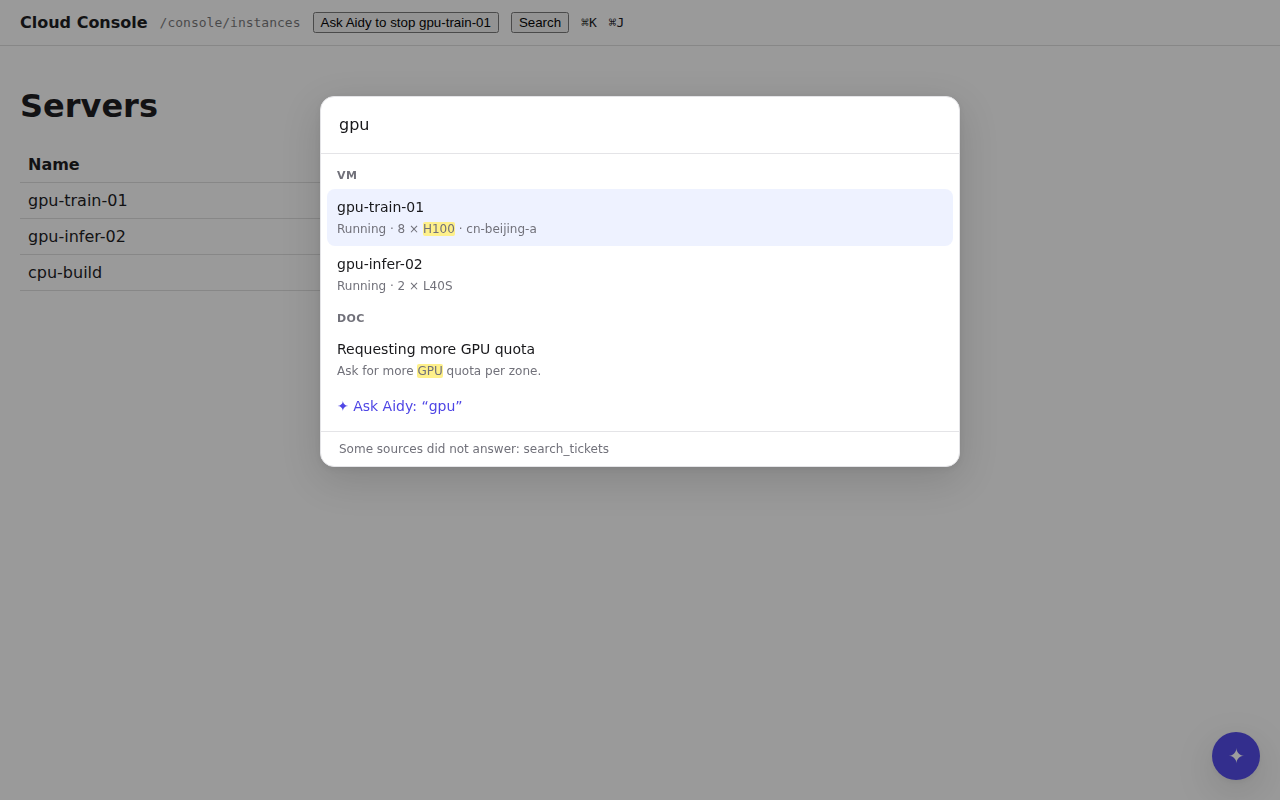
The palette, the agent's search tool, MCP and the CLI (acme search "gpu") run the same
search. Each of your role: search operations is a source, and your docs, indexed by rungent, are
one more, named knowledge.
Add a search source#
A search source is a GET with a required q query parameter and an optional limit:
"/api/vms/search": { "get": { "x-rungent": { "name": "search_vms", "role": "search" } } }
GET /api/vms/search?q=gpu&limit=10 answers its best hits first:
{
  "hits": [
    { "type": "vm", "id": "vm-42", "title": "gpu-train-01", "excerpt": "Running · 8 × «H100» · cn-beijing-a",
      "url": "/console/instance/vm-42", "updatedAt": "2026-11-19T08:00:00Z" }
  ]
}
| Field | Meaning |
|---|---|
type |
Required. A short kind (vm, doc), for grouping and filtering. |
id |
Required. Unique within the type. |
title |
Required. |
url |
Required. A path in your product, or an absolute URL. |
excerpt |
Plain text, at most 300 characters; matches may be wrapped in «…». |
updatedAt |
An RFC 3339 time. |
content |
The passage itself, at most 4000 characters, for the model only. People never see it. |
rungent calls each source as the user, so your permission checks already filter the hits. limit
defaults to 10 and is at most 50.
One search over every source#
rungent asks every source at once, each with its own timeout (2 seconds by default, at most 10, set
with timeoutSeconds), and merges the lists by reciprocal rank fusion: a hit's place depends on
the rank each source gave it, so the sources' scores never need to be comparable. A source that
times out or fails is listed in failed, and the others still answer.
Add your docs#
With rungent serve, two variables index a folder of Markdown at start:
RUNGENT_KNOWLEDGE_DIR=/srv/docs
RUNGENT_KNOWLEDGE_BASE_URL=https://docs.acme.example.com
Every .md and .mdx file under the folder becomes a page. Its address is the base URL plus its
path without the extension (deploy/certificates.md becomes …/deploy/certificates, and an
index file stands for its folder); its title is the frontmatter title, else the first heading.
Unchanged pages are skipped, so a restart is cheap. The base URL may be a path on your product
(/help).
Index docs from code#
Embedded, or to choose who sees which docs, use rungent/knowledge. It runs on Postgres,
SQLite or D1 and may share rungent's database: its tables start with rungent_knowledge_.
import { readFile } from 'node:fs/promises';
import { createKnowledge } from 'rungent/knowledge';
import { postgresDriver } from 'rungent/sql/postgres';

const knowledge = createKnowledge({ driver: postgresDriver(process.env.DATABASE_URL!) });
await knowledge.migrate();

await knowledge.ingest('docs', [
  {
    id: 'deploy/certificates',
    title: 'Rotate certificates',
    url: '/help/deploy/certificates',
    markdown: await readFile('docs/deploy/certificates.md', 'utf8'),
  },
]);

const rungent = createRungent({
  // ...
  sources: [knowledge.source({ collections: (identity) => ['docs', `manuals/${identity.tenant}`] })],
});
ingest(collection, documents)adds or replaces documents and answers{ updated, unchanged }. Run it after each docs build; unchanged documents are skipped, and sections whose text did not change keep their embeddings.remove(collection, ids)deletes documents your source no longer has.collectionsreceives the user's identity and picks what that user may search, so a tenant's private manuals stay with that tenant. The source is namedknowledge; passnameto change it.embedanddimensionsadd search by meaning ("cert expiry" finds "Rotate certificates") with any embedding provider:
const knowledge = createKnowledge({
  driver,
  embed: async (texts) =>
    (await openai.embeddings.create({ model: 'text-embedding-3-small', input: texts })).data.map((d) => d.embedding),
  dimensions: 1536,
});
Without an embedder, search works on words alone, Chinese included. Vector search reads at most the newest 20,000 sections of the searched collections per query.
Write docs that cite well#
rungent splits each page at its h1 to h3 headings, and cuts a section longer than about 800 tokens at
paragraphs. A hit's title is page title › heading, and its link is the page address plus the
heading's anchor. Write so that each section answers one question under a heading that names it.
Give a heading an explicit id when its anchor must not change with its wording:
## Rotate certificates {#rotate}
Grounding and citations#
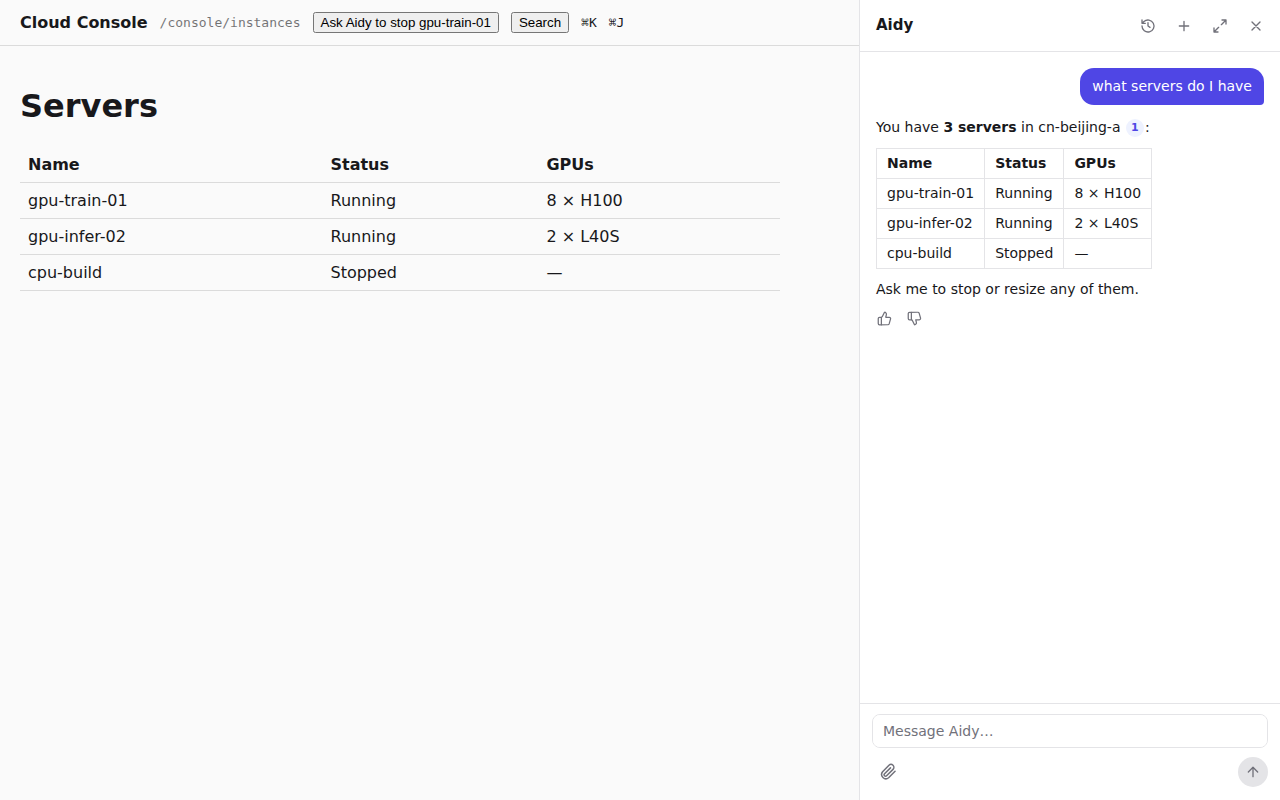
With knowledge, each new user message starts with a search for its text (the first 200
characters, 5 hits) before the model's first step. It is an ordinary search call in the
conversation, so the user sees it with the other lookups. The model is told to answer questions
about your product only from tool results and search hits, to search again with other words
when the hits do not answer, and to say so when nothing does. Without knowledge, the agent
searches your role: search operations when it needs to find something.
The search tool numbers hits from 1 across the run and gives the model their content. When an
answer cites [1], the run emits a rungent.citation event mapping each number to its hit
(without content), and the dock renders it as a link to the hit's url.
Where to go next#
Surfaces puts the palette beside the dock, MCP and the CLI.
For agents: search.mdEdit this page