# Overview
## The problem
A product that wants agents to use it ends up building the same thing seven times:
| Surface | Who uses it | Usually built as |
|---|---|---|
| An agent inside the product | your users | a chat widget with its own tool list |
| An MCP server | Claude Code, Cursor, Codex | a second tool list, often on a service account |
| A CLI | developers and their agents | a third copy of the API |
| A skill | coding agents | a hand-written file that drifts |
| Docs agents can read | any agent | `llms.txt`, if anyone remembers |
| Global search | everyone | a separate index of resources |
| Answers from your docs (RAG) | everyone | a separate pipeline with its own model |
Each copy drifts from the API. Each has its own idea of permissions, often broader than the
user's. Writes skip the form your page uses, so an agent asks for different fields than
your UI does, and the same request gets a form one time and a chat interview the next.
## What rungent is
**rungent turns one catalog, your OpenAPI with `x-rungent` on the operations agents may use, into
all seven surfaces, and runs every one of them as the signed-in user.**
Three rules hold on every surface:
- **One catalog.** The agent, MCP tools, CLI commands, skill and search are all generated
from your operations, so they always say the same thing.
- **One identity.** rungent calls your API with the user's own credential and a signed
assertion. It has no rights of its own; your permissions decide.
- **One path for changes.** A request to change something opens your page's own form,
then an approval card bound to the exact arguments, then the call. Never a chat interview.
rungent is one npm package, `rungent`, a server image for non-JavaScript stacks, and a
Python kit. It runs on Node, Bun, Deno and Cloudflare Workers.
## Start with one sentence
Send your coding agent:
```text
Install the rungent skill from https://rungent.acahti.dev/skills/rungent/SKILL.md, then make this product agent-native with it.
```
The skill teaches the agent the whole integration: annotate the operations, add the
identity operation, verify rungent's assertion, mount rungent and the dock, add your docs as
knowledge, and test it. You review a pull request. [Quickstart](quickstart.md) shows what it
writes, if you would rather do it by hand.
Once you ship, your product serves its own `skill.md`, and your users send *their* agents:
```text
Install the skill at https://console.example.com/skill.md and use it to manage my servers.
```
## Two sides, one catalog
rungent has two audiences, and the catalog is where they meet.
*rungent: the build side writes one catalog; the use side gets every surface from it*
- **The build side** is you and your coding agent. You read the [rungent skill](quickstart.md)
and these docs. You write annotations, one identity operation, one middleware and one
React component. Nothing else.
- **The use side** is your users and their agents. They never read these docs. They see
your product: the assistant beside its pages, ⌘K, and the `skill.md`, `/mcp` and CLI it
serves. Everything they can do is in your catalog, filtered to what they may do.
## How it is built
*rungent between the surfaces people use and your product's API*
rungent sits between the surfaces and your API. It reads your catalog with each user's
credential, runs the agent loop, sends every change through form and approval, streams
the conversation as AG-UI events, and federates search over your resources and docs. Your
product keeps the decisions: identity, permissions, forms and facts. See
[How it works](how-it-works.md).
## Concepts
| Word | Meaning | Page |
|---|---|---|
| Catalog | Your OpenAPI operations marked `x-rungent`, as one user sees them | [The catalog](catalog.md) |
| Identity | Whose request it is; every call is made as that user | [Acting as the user](acting-as-the-user.md) |
| Change path | Route → your form → approval → call | [Forms and approvals](forms-and-approvals.md) |
| Knowledge | Your docs and resources, searched and cited | [Search and knowledge](search.md) |
| Surfaces | Dock, ⌘K, MCP, CLI, `skill.md`, `llms.txt` | [Surfaces](surfaces.md) |
## Where to go next
> **Version 0.** The protocol is `rungent/0` and the HTTP API lives under `/rungent/v0`; a minor
> release may still break it, and the [changelog](changelog.md) lists every break.
# Quickstart
## With your coding agent
Send this to Claude Code, Codex, Cursor or any coding agent working in your repository:
```text
Install the rungent skill from https://rungent.acahti.dev/skills/rungent/SKILL.md, then make this product agent-native with it.
```
The agent saves the skill where it keeps skills (`.claude/skills/rungent/`, `.agents/skills/rungent/`)
and follows it:
- AnnotateMarks the operations users act on with x-rungent.
- IdentifyAdds one operation that says who is signed in.
- MountServes rungent from your API, or runs rungent serve beside it.
- VerifyChecks rungent's signed assertion on annotated routes.
- DockMounts the assistant and your page forms in the web app.
It then runs `rungent check --openapi` on your API's document and opens a pull request. Review three
things: which operations it exposed, which are writes, and that the middleware rejects a
bad assertion. The rest of this page is what it writes, for a JavaScript API.
## Install
```bash
npm install rungent
```
One package: the runtime, the React dock, the client, SQL stores and the `rungent` command.
You also need a model API key; any chain from [Deploy](deploy.md#choose-models) works.
## Annotate a read and a write
An operation joins the catalog when it carries `x-rungent`; every other route stays invisible.
With Hono and `@hono/zod-openapi`, the key goes on the route:
```ts
// src/api.ts
import { OpenAPIHono, createRoute, z } from '@hono/zod-openapi';
export type User = { id: string; orgId: string; name: string };
export const app = new OpenAPIHono<{ Variables: { user: User } }>();
app.use('/api/*', authenticate); // your session middleware; it sets c.var.user
const Vm = z.object({ id: z.string(), name: z.string(), status: z.enum(['running', 'stopped']) });
app.openapi(
createRoute({
method: 'get',
path: '/api/vms',
responses: { 200: { description: 'Servers', content: { 'application/json': { schema: z.array(Vm) } } } },
'x-rungent': { name: 'list_vms', description: 'List cloud servers (VMs) and their status.' },
}),
async (c) => c.json(await listVms(c.var.user), 200),
);
app.openapi(
createRoute({
method: 'post',
path: '/api/vms/{vm_id}/stop',
request: { params: z.object({ vm_id: z.string() }) },
responses: { 200: { description: 'Stopped', content: { 'application/json': { schema: Vm } } } },
'x-rungent': {
name: 'stop_vm',
description: 'Stop a running cloud server (VM).',
effect: 'update',
resolve: { vm_id: { op: 'list_vms' } },
confirmation: { title: 'Stop server {vm_id}?' },
},
}),
async (c) => c.json(await stopVm(c.var.user, c.req.valid('param').vm_id), 200),
);
```
A `GET` is a read: the agent calls it freely. A write waits for the user's approval.
`resolve` lets the user say "train-01" where the API wants `vm-42`. See [The catalog](catalog.md).
## Say who is signed in
One operation with `role: 'identity'` tells rungent whose request it is. rungent calls it with the
user's own cookie or `Authorization` header, so your auth middleware answers as usual.
```ts
app.openapi(
createRoute({
method: 'get',
path: '/api/me',
responses: { 200: { description: 'Me', content: { 'application/json': { schema: z.object({ subject: z.string(), tenant: z.string(), name: z.string() }) } } } },
'x-rungent': { name: 'whoami', role: 'identity' },
}),
(c) => c.json({ subject: c.var.user.id, tenant: c.var.user.orgId, name: c.var.user.name }, 200),
);
app.doc31('/api/openapi.json', { openapi: '3.1.0', info: { title: 'Cloud Console', version: '1' } });
```
## Mount rungent
`createRungent` returns a Web-standard `fetch` handler. Give it your app's own `fetch`, so its
calls to your API stay in the process.
```ts
// src/server.ts
import { serve } from '@hono/node-server';
import { createRungent, SqlStore } from 'rungent';
import { importSigningKey } from 'rungent/delegation';
import { postgresDriver } from 'rungent/sql/postgres';
import { app } from './api';
const origin = 'https://console.example.com';
const rungent = createRungent({
url: origin,
host: { origin, openapi: '/api/openapi.json', fetch: app.fetch },
signingKey: await importSigningKey(JSON.parse(process.env.RUNGENT_SIGNING_KEY!)),
secret: process.env.RUNGENT_SECRET!,
store: new SqlStore(postgresDriver(process.env.DATABASE_URL!)),
models: { chain: [{ id: 'main', provider: 'openai', model: 'gpt-4.1-mini', apiKey: process.env.OPENAI_API_KEY }] },
});
for (const path of ['/rungent/v0/*', '/mcp', '/skill.md', '/llms.txt', '/.well-known/rungent-keys.json']) {
app.all(path, (c) => rungent.fetch(c.req.raw));
}
serve({ fetch: app.fetch, port: 3000 });
```
Generate the signing key once and keep it in a secret; the public half goes to your API:
```bash
npx rungent keys generate --kid rungent-2026-11 -o rungent-2026-11.private.jwk
openssl rand -base64 48 # RUNGENT_SECRET
```
rungent creates its `rungent_*` tables on the first request. For development, `MemoryStore` and a
key from `generateKeyPair('dev')` skip both steps. Express, Workers and Python are in
[JavaScript hosts](javascript.md) and [Python and other stacks](python.md).
## Verify the assertion
Every call rungent makes carries a `Rungent-Assertion` next to the user's credential. Your API
checks that rungent signed it for this request, this user and this operation, and, for a
write, that the user approved it:
```ts
// src/rungent-call.ts
import { ASSERTION_HEADER, AssertionError, checkCall, importPublicKeys, verifyAssertion } from 'rungent/delegation';
import { createMiddleware } from 'hono/factory';
import type { User } from './api';
const keys = await importPublicKeys([JSON.parse(process.env.RUNGENT_PUBLIC_JWK!)]);
const seen = new Map(); // jti → expiry; Redis or KV with several processes
export const rungentCall = (op: string, approval: 'never' | 'always') =>
createMiddleware<{ Variables: { user: User } }>(async (c, next) => {
const token = c.req.header(ASSERTION_HEADER);
if (!token) return next(); // an ordinary request from your UI
try {
const claims = await verifyAssertion(token, {
keys,
audience: 'https://console.example.com',
request: { method: c.req.method, url: c.req.url, body: new Uint8Array(await c.req.raw.clone().arrayBuffer()) },
remember: (jti, until) => !seen.has(jti) && Boolean(seen.set(jti, until)),
});
checkCall(claims, { subject: c.var.user.id, tenant: c.var.user.orgId, op, approval });
} catch (error) {
if (error instanceof AssertionError) return c.json({ error: 'rungent_assertion_invalid', code: error.code }, 401);
throw error;
}
return next();
});
```
Add `middleware: [rungentCall('stop_vm', 'always')]` to `stop_vm` and `rungentCall('list_vms', 'never')`
to `list_vms`. What each check guards against is in [Acting as the user](acting-as-the-user.md).
## Open the dock
Mount the dock once, in the web app's root layout, so it stays put while the user moves
between pages:
```tsx
// web/RootLayout.tsx
import { createClient } from 'rungent/client';
import { RungentDock, RungentProvider } from 'rungent/react';
import 'rungent/react/styles.css';
const client = createClient();
export function RootLayout({ children }: { children: React.ReactNode }) {
return (
{children}
);
}
```
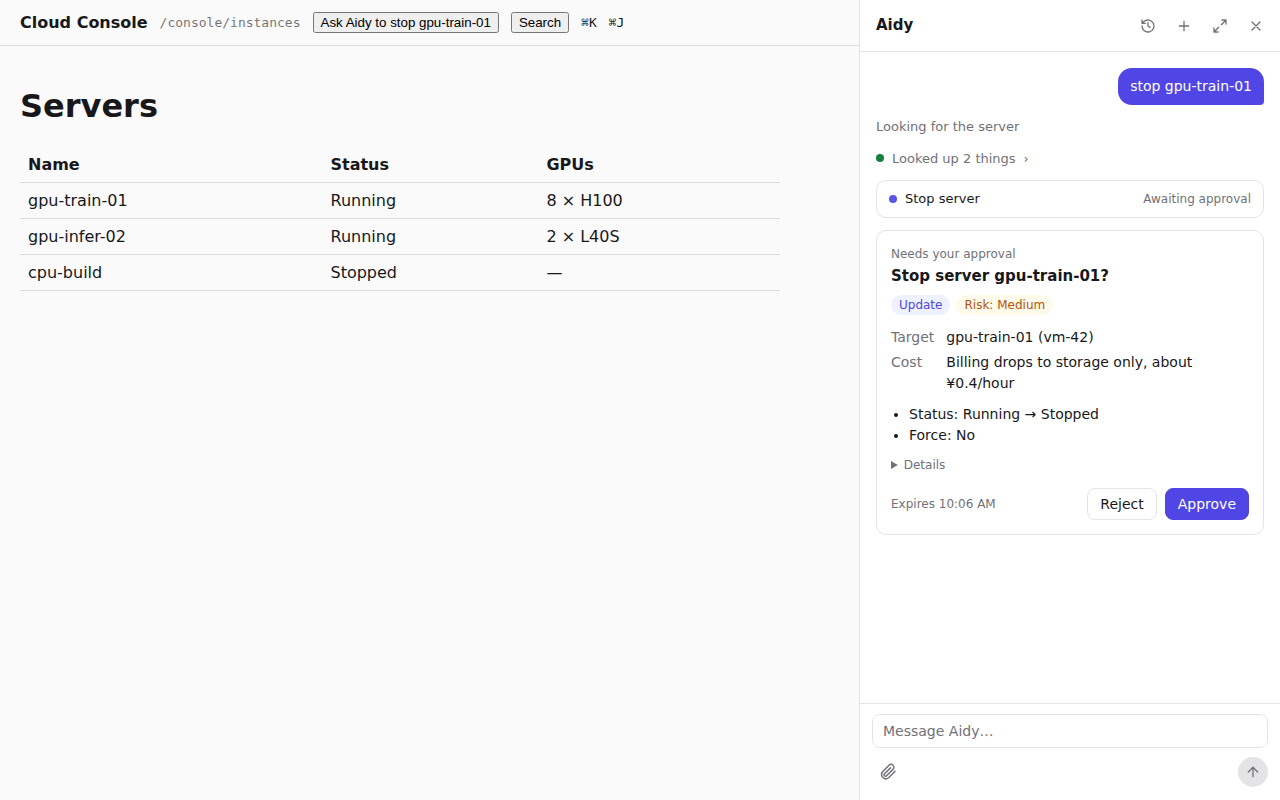
Press ⌘J and type "stop train-01". rungent looks up `vm-42` as you, shows a card titled
"Stop server vm-42?", and calls your API only after you approve.
## Where to go next
- [Forms and approvals](forms-and-approvals.md): open your page's own create form in the conversation.
- [Search and knowledge](search.md): answer from your docs, with citations.
# How it works
*rungent between the surfaces people use and your product's API*
## What you install
rungent is one runtime, written in TypeScript on Web-standard APIs. It ships as one npm package,
`rungent`, whose entry points you import as your stack needs them:
| Import | What it is |
|---|---|
| `rungent` | The runtime: `createRungent`, the stores |
| `rungent/react` | The dock, ⌘K palette, approval cards, forms, model settings |
| `rungent/client` | A typed client of the HTTP API that reduces its events into a thread |
| `rungent/delegation` | Signing keys, and the assertion checks your API runs |
| `rungent/knowledge` | Your docs as a cited search source |
| `rungent/sql/postgres`, `/sql/sqlite`, `/sql/d1` | Database drivers for the stores and knowledge |
| `rungent/node` | `nodeHandler` for Node's `(req, res)`, and the server behind `rungent serve` |
| `rungent/cli` | The CLI as a library, for a branded CLI |
| `rungent/protocol`, `/catalog`, `/search`, `/documents` | The contract's types and helpers, for tools of your own |
The package's one command is `rungent`: the CLI of every rungent host, the authoring tools (`check`,
`keys`, `brand`) and `rungent serve`. Two more pieces live outside npm: the Docker image
`ghcr.io/rungent/rungent-server`, which runs `rungent serve`, and the Python kit `rungent` on PyPI (imported as `rungent`).
## Where the runtime runs
- Embedded
- Your JavaScript APIHono, Express, Workers, Node
- rungent in the same processone fetch handler
- Beside your API
- Your APIPython, Go, Java, …
- rungent serve next to ityour proxy forwards /rungent and /mcp
- Either way
- Same originyour users' cookies just work
- Same contractOpenAPI in, assertions out
Both shapes serve the same paths on your own domain: `/rungent/v0/*` for the assistant, `/mcp`,
`/skill.md`, `/llms.txt` and `/.well-known/rungent-keys.json`. Your web app calls them as
same-origin requests, so the user's existing session is the credential.
[JavaScript](javascript.md) embeds rungent; [Python and other stacks](python.md) runs it beside
your API.
## One request, step by step
When a user sends a message, rungent runs these steps. Each one is in code, not in a prompt.
- Catalogrungent reads your OpenAPI with the user's credential and keeps the operations marked x-rungent that the user may see.
- GroundIf you gave rungent your docs, it searches them for the user's words first.
- RouteA request to create or change something goes straight to that operation.
- FormThe operation's form opens, prefilled: your page's own form in your app.
- ResolveNames the user typed ("train-01") become ids, through your list operations.
- ApproveA write shows a card with its target and changes; the approval binds to those exact arguments.
- Callrungent calls your API with the user's credential and a signed assertion; you authorize it.
- StreamText, tool activity and results stream to the UI as events, resumable after a disconnect.
Questions take the short path: the agent looks things up with your read operations and
search, and answers with citations. Reads never ask for approval unless you say so.
## Calls as the user
rungent has no account in your product. Every call carries the user's own credential, so your
permission checks run unchanged, and a `Rungent-Assertion`: a signed token naming the user, the
operation, the exact request and the approval. Your API verifies it with rungent's public key.
See [Acting as the user](acting-as-the-user.md).
## The protocol
The assistant speaks [AG-UI](https://docs.ag-ui.com) over HTTP with server-sent events. rungent
adds a small profile: a sequence number on every event, so a client that reconnects gets
exactly what it missed, and four kinds of pause, each answered by the user:
| Pause | When | The user answers with |
|---|---|---|
| Approval | Before a write | Approve or reject |
| Form | Before an operation with a form | The operation's complete arguments |
| Question | The agent asks which thing or which action | A choice |
| Task | Your API runs the work later | Nothing; your API reports back |
Any AG-UI client can drive rungent; the React dock is one. See [HTTP API](http-api.md#events).
## How rungent differs
Agent frameworks (LangGraph, Mastra, the Vercel AI SDK) give you a loop and leave the tools,
identity and UI to you. OpenAPI generators (Stainless, Speakeasy) give developers SDKs and MCP
servers that call your API with the developer's own key. rungent starts from the API you already
have and runs the agent inside your product for the signed-in user, with your forms and an
approval enforced in code. It combines with them: a long LangGraph workflow can be an operation
that answers [a deferred task](http-api.md#deferred-tasks).
## Words used in these docs
| Word | Meaning |
|---|---|
| Host | Your product, the service whose API rungent calls |
| Catalog | The operations of your OpenAPI that carry `x-rungent`, as one user sees them |
| Operation | One HTTP endpoint in the catalog; a tool for the agent, MCP and the CLI |
| Effect | What an operation does: read, create, update, delete, or reach outside |
| Write | Any operation whose effect is not `read` |
| Surface | Where an operation appears: the assistant, MCP, the CLI |
| Identity | The one operation that says who a credential belongs to |
| Assertion | The signed token on every call rungent makes for a user |
| Form | The input an operation collects from the user before it runs |
| Routing | The step that sends a request to change something to its form |
| Interrupt | A pause in a run that waits for the user: approval, form, question or task |
| Dock | The assistant panel beside your pages, from `rungent/react` |
# The catalog
A cloud console already has an OpenAPI 3.1 document. Three of its endpoints become a catalog
with one `x-rungent` object each:
```json
"/api/vms": {
"get": {
"x-rungent": { "name": "list_vms", "description": "List the user's cloud servers (VMs)." }
},
"post": {
"x-rungent": { "name": "create_vm", "description": "Create a cloud server (VM).", "form": "vm_form" }
}
},
"/api/vms/{vm_id}/stop": {
"post": {
"x-rungent": {
"name": "stop_vm",
"description": "Stop a running cloud server (VM).",
"effect": "update",
"resolve": { "vm_id": { "op": "list_vms" } },
"confirmation": { "title": "Stop server {vm_id}?" }
}
}
}
```
Operations without `x-rungent` stay invisible to rungent. The assistant, MCP, the CLI, `skill.md` and
search all read the same annotations, so you describe each operation once. Every key is in
[x-rungent](x-rungent.md).
## What an operation is
An operation is one HTTP method on one path that carries `x-rungent`. It is a tool for the agent,
a tool for MCP clients and a command of the CLI. Its `name` is the only required key: lowercase
letters, digits and `_`, at most 64 characters, unique in the catalog.
| Where | Spelling |
|---|---|
| The agent's tool, the MCP tool, the assertion's `op` | `stop_vm` |
| The CLI command | `stop-vm`, or the words in `cli.command` (`vm stop`) |
`description` is what the model reads to choose a tool: name the resource and the words users
say for it ("cloud server (VM)"). `title` labels approval cards, activity rows and CLI help.
Both default to the OpenAPI `summary`.
## Effects, approval and surfaces
`effect` says what a call does, and it sets the defaults for everything else. rungent takes it
from the HTTP method unless you say otherwise:
| `effect` | Meaning | Default for | `approval` | `surfaces` |
|---|---|---|---|---|
| `read` | Changes nothing | `GET`, `HEAD` | `never` | `agent`, `mcp`, `cli` |
| `create` | Creates something | `POST` | `always` | `agent`, `cli` |
| `update` | Changes something that exists | `PUT`, `PATCH` | `always` | `agent`, `cli` |
| `delete` | Removes something | `DELETE` | `always` | `agent`, `cli` |
| `external` | Reaches outside: sends mail, charges a card | none | `always` | `agent`, `cli` |
Set `effect` when the method does not say it: stopping a server is a `POST` that changes an
existing server, so `stop_vm` is an `update`. A `GET` must stay a `read`.
- **`approval`** is `never` or `always`, decided by the runtime from the catalog, never by a
prompt. A read that should still be confirmed, such as exporting every customer, sets
`"approval": "always"`. See [Forms and approvals](forms-and-approvals.md).
- **`surfaces`** lists where the operation appears. MCP starts read-only; list `mcp` on a write
to offer it to MCP clients that can ask the user to confirm. See [Surfaces](surfaces.md).
## Operations with a special role
Some operations answer rungent itself instead of being tools. They carry `role`, have no surfaces,
and are never offered to the model:
| `role` | Shape | Page |
|---|---|---|
| `identity` | `GET`, no parameters; exactly one per catalog | [Acting as the user](acting-as-the-user.md#who-the-user-is) |
| `search` | `GET` with a required `q` query parameter | [Search and knowledge](search.md#add-a-search-source) |
| `form` | `POST` that answers a form; rungent treats it as a read | [Forms and approvals](forms-and-approvals.md#declare-the-form) |
## Each user sees their own catalog
rungent fetches your OpenAPI document with the signed-in user's own credential and keeps what it
read for 5 minutes per credential. Your server may leave out operations a user may not call,
and no surface offers them to that user. `GET /rungent/v0/catalog` lists what the caller sees.
Hiding an operation is a courtesy: your API still authorizes every call it receives.
## The input schema
rungent turns each operation into one flat input schema, which the model, MCP clients and the CLI
all see:
- Path and query parameters become top-level properties; path parameters are required.
- A JSON body that is an object with `properties` is flattened into top-level properties; any
other body becomes one `body` property.
- `$ref`s into `#/components/schemas` stay as `$defs` references, so recursive schemas stay
valid.
For `POST /api/vms/{vm_id}/stop` with the body `{"forced": boolean}`, the input is
`{vm_id, forced}`, with `vm_id` required. rungent splits the arguments back into path, query and
body when it calls your API.
Before any call, rungent coerces the arguments (a numeric string to a number, a JSON string to an
object) and validates them. Arguments that do not fit never reach your API: the model gets
`invalid_arguments` with each problem at its path (`vm_id: required`) and corrects its call.
An operation with a form opens its form instead.
## Turn names into ids
The user writes "stop gpu-train-01"; your route takes `vm-42`. `resolve` maps an argument to the
read operation that lists its candidates, `{op, key?}`, where `key` is the item field holding
the id (`id` by default). For each listed argument that holds a string, rungent:
1. calls `op` as the user, asking for 100 items when it takes a `page_size` query parameter;
2. takes the items from the answer: the array itself, or the first nested array of objects that
carry `key` (`{"items": [...]}`);
3. keeps the value when an item's `key` equals it, because it is already an id;
4. otherwise compares it with each item's `name`, `display_name`, `displayName` or `title`,
ignoring case, and replaces it with the one match's `key`.
No match, or several, fails the call with `unresolved_reference` and names up to ten
candidates, so the model can pick one or ask the user. Names resolve before the approval card,
so the approval binds to `vm-42` and a rename while the card waits cannot change what runs. A
confirmation [lookup](forms-and-approvals.md#write-the-card) puts the name back on the card.
Resolve suits collections one list call returns whole: servers, projects, members. For larger
ones, the model finds the id with [search](search.md) or a filtered list.
## Run two calls as one
Some actions take two calls: prepare a draft that checks quota and prices it, then commit it.
`next` on the first operation names the second, and rungent runs it right after success, before
the model writes anything:
```json
"x-rungent": {
"name": "prepare_vm_draft",
"approval": "never",
"next": {
"op": "commit_vm_draft",
"arguments": { "draft_id": "id", "revision": "revision" },
"when": { "status": "prepared" }
}
}
```
The draft answers `{"id": "d-7", "revision": 3, "status": "prepared", …}`, so rungent calls
`commit_vm_draft` with `{"draft_id": "d-7", "revision": 3}`. A draft that answers
`"status": "needs_quota"` fails `when`: the chain stops and the model explains the result.
`argumentsFrom` takes a result object as the next call's whole input instead
([x-rungent](x-rungent.md#chains)).
The next call goes through validation, resolve and its own approval like any other, so a chain
never skips a card. Each operation runs at most once per chain, so a cycle ends.
## What happens after a call
- `open` names a page of your product to show after success, filled from the arguments and the
result (`/console/instance/{vm_id}`). The dock passes it to your router.
- `redact` lists result fields the model and MCP clients never see (`ip`). Fields with
secret-like names (`password`, `token`, `api_key`, `cookie` and similar) are always removed.
- `timeoutSeconds` bounds the call: 120 seconds by default, at most 3600.
- Within one run, a write repeated with identical arguments is answered from the first result.
Set `repeatable: true` when repeating is the point ("add one more GPU").
- An operation that needs longer than a request answers `202 {"rungentTask": ""}`, and the run
waits until your API [completes the task](http-api.md#deferred-tasks).
## Check the catalog
rungent validates the catalog when it reads it and refuses one with errors. Check a document
before you deploy it:
```bash
npx rungent check --openapi http://localhost:3000/api/openapi.json --routes routes.txt
```
It prints every issue and exits 1 when there is any; the rules are in
[x-rungent](x-rungent.md#validation-rules). `--routes` takes the requests your UI makes, one
`METHOD /path` per line, and fails each one no operation serves, unless the line ends with
`# browser-only: `. That keeps the agent able to do what your UI does.
## Where to go next
[Acting as the user](acting-as-the-user.md) shows how rungent calls these operations with the
user's own rights.
# Acting as the user
*rungent between the surfaces people use and your product's API*
When a user approves "Stop server gpu-train-01?", rungent sends your API this request:
```http
POST /api/vms/vm-42/stop HTTP/1.1
Host: console.example.com
Authorization: Bearer
Rungent-Assertion: eyJhbGciOiJFZERTQSIsImtpZCI6InJ1bmdlbnQtMjAyNi0xMSIsInR5cCI6InJ1bmdlbnQtY2FsbCtqd3QifQ…
Content-Type: application/json
{"forced":false}
```
Your API authenticates the credential as it always does, so the user's own permissions decide
what the call may do. The assertion proves the rest: rungent sent this exact request, for this
user, for this operation, after the user approved these arguments.
## Who the user is
rungent keeps no user database. It asks your API through the one catalog operation with
`role: identity`, a `GET` without parameters:
```json
"/api/me": { "get": { "x-rungent": { "name": "whoami", "role": "identity" } } }
```
```json
{ "subject": "u_123", "tenant": "t_9", "name": "Ada Lovelace", "locale": "zh-CN", "scopes": ["rungent:admin"] }
```
| Field | Meaning |
|---|---|
| `subject` | Required. The user's stable id in your product. |
| `tenant` | The organization or workspace the credential acts in, when your product has one. |
| `name` | The display name. |
| `locale` | A language tag such as `en` or `zh-CN`; the assistant answers in it unless the user writes in another. |
| `scopes` | `rungent:admin` lets the user change rungent's model settings and read feedback. |
rungent calls it with each request's credential, as an ordinary request without an assertion, and
remembers the answer for 60 seconds per credential. A `4xx` from it makes rungent answer `401`.
Conversations belong to one `(subject, tenant)`: the same person in two tenants has two
histories, and nobody else can read them.
## The user's credential
rungent forwards the request's `Authorization` and `Cookie` headers exactly as it received them,
and no other header of the user's. In your web app that is the session the user already has,
because rungent is served on your own origin. MCP clients and the CLI send a bearer token your API
accepts.
rungent holds the credential in memory for the length of a run and never stores it. When it expires
mid-run, the call fails with `credential_expired`, and the user's next message brings a fresh one.
## What the assertion binds
`Rungent-Assertion` is a compact JWS signed with Ed25519 (`alg: EdDSA`, `typ: rungent-call+jwt`, and
the signing key's `kid`). Its claims tie it to one request:
| Claim | Meaning |
|---|---|
| `iss` | The rungent instance's URL |
| `aud` | Your origin, `https://console.example.com` |
| `sub`, `ten` | The user's `subject` and `tenant` |
| `op` | The catalog operation, `stop_vm` |
| `htm`, `htu` | The method, and your public origin followed by the path and query |
| `bsh` | base64url SHA-256 of the exact body bytes (the empty-body hash when there is none) |
| `apr` | The approval's id, when the user approved this call |
| `sid`, `rid`, `cid` | The conversation, run and tool call, for your audit log |
| `iat`, `exp` | Issued and expires, at most 60 seconds apart |
| `jti` | A unique id, so the assertion is used once |
A stolen assertion is worth very little: it names one method, one URL and one body, lives for a
minute, and is accepted once.
## Verify the assertion
A request without `Rungent-Assertion` is an ordinary user request. With one, your API answers `401`
with `rungent_assertion_invalid` unless all of these hold:
1. The signature verifies with a rungent public key pinned in your configuration, selected by
`kid`. Never fetch keys from the request.
2. `aud` is your origin, `exp` has not passed (60 seconds of clock skew at most), and `jti` was
not seen before.
3. `htm` and `bsh` match the request as received, and `htu` is your public origin followed by
its path and query.
4. `sub` and `ten` equal the identity you resolved from the request's own credential.
5. `op` is the catalog operation that serves this method and path.
6. When that operation has `approval: always`, `apr` is present.
The helpers do it for you. In TypeScript, `verifyAssertion` runs checks 1 to 3 and `checkCall`
the rest; the [Quickstart](quickstart.md#verify-the-assertion) wraps them in a Hono middleware:
```ts
import { checkCall, importPublicKeys, verifyAssertion } from 'rungent/delegation';
const keys = await importPublicKeys([RUNGENT_PUBLIC_JWK]);
const claims = await verifyAssertion(assertion, {
keys,
audience: 'https://console.example.com',
request: { method: 'POST', url: 'https://console.example.com/api/vms/vm-42/stop', body: rawBody },
remember: (jti, until) => replays.add(jti, until), // false when it was seen before
});
checkCall(claims, { subject: user.id, tenant: user.tenantId, op: 'stop_vm', approval: 'always' });
```
In FastAPI, `RungentHost` is one middleware that matches the operation from your routes and runs all
six checks; see [Python and other stacks](python.md#verify-the-assertion), which also covers
other languages. Three things are easy to get wrong:
- **The public URL.** `htu` names your public origin even when rungent reaches your API at an
internal address. Behind a proxy that strips a path prefix, put the prefix back.
- **One replay cache.** Every worker that serves your API must share the record of seen `jti`s,
or a replay may land on a worker that never saw it.
- **Stop at your edge.** A gateway that forwards the request to other services removes
`Rungent-Assertion` first; the assertion is for the service that verified it.
Record `actor = rungent`, `rid` and `apr` in your audit log, so every change made through rungent
traces back to a run and an approval.
## Keys and rotation
```bash
npx rungent keys generate --kid rungent-2026-11 -o rungent-2026-11.private.jwk
```
It writes the private key, rungent's signing secret, to a new file only you can read, and prints the
public JWK for your API's configuration. rungent also serves the public key at
`/.well-known/rungent-keys.json`, for inspection. To rotate:
1. Generate a key with a new `kid`.
2. Add its public JWK to your API, next to the old one, and deploy.
3. Switch rungent's signing key to the new private key and deploy.
4. After two minutes (an assertion lives 60 seconds, plus 60 seconds of skew), remove the old
public key from your API.
## Calls from your API to rungent
Two calls run the other way: completing a deferred task and a host job (one model completion
for your backend, such as a weekly report's summary). Your API signs each with an
`Rungent-Host-Assertion`: the same claims, signed with a key of yours that rungent pins in `hostKeys`,
with `aud` set to rungent's URL. See [HTTP API](http-api.md#host-assertions).
## Where to go next
[Forms and approvals](forms-and-approvals.md) shows where `apr` comes from and what the user
sees before it.
# Forms and approvals
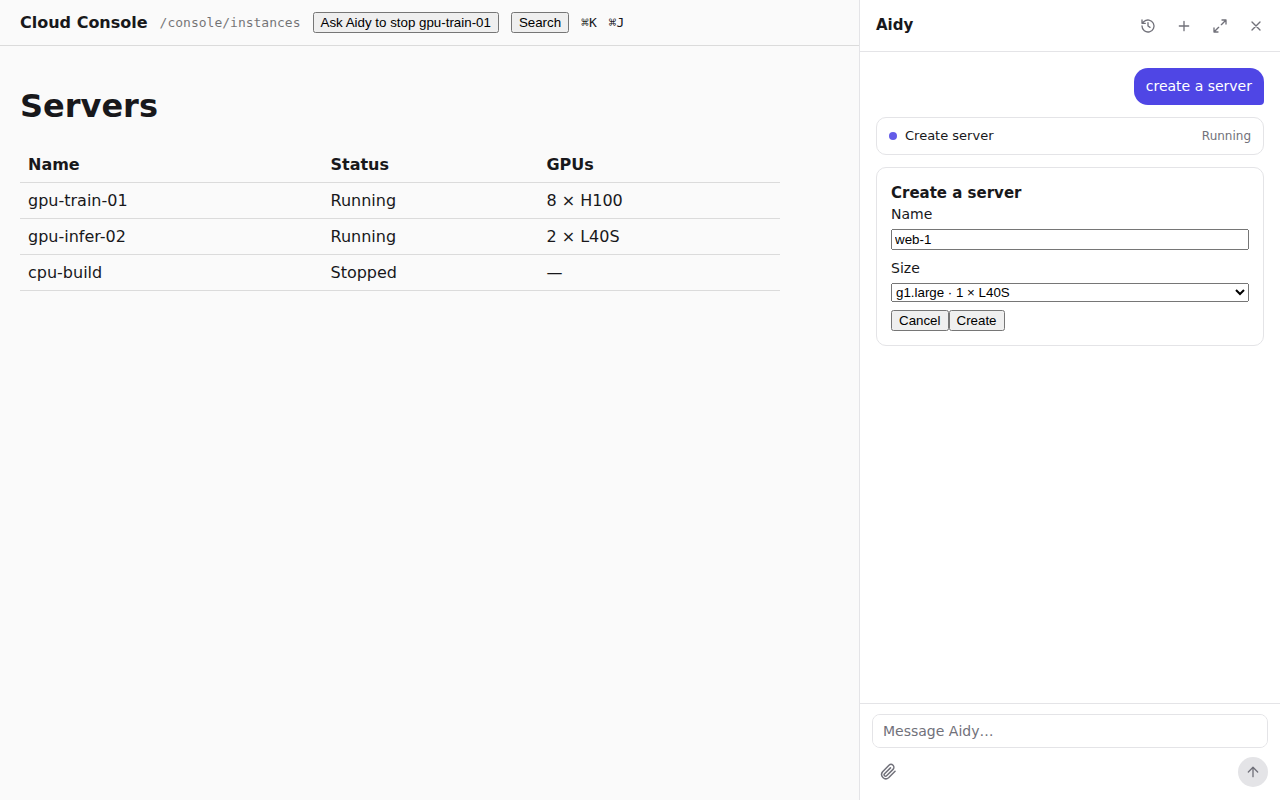
- Ask“Create a GPU server called train-01.”
- RouteOne quiet model call picks create_vm and keeps what the user said: the name.
- FormYour create form opens in the conversation with the name filled in.
- ResolveThe submission is validated, and names become ids.
- ApproveA card shows exactly what was submitted; the user approves it.
- RunYour API receives the call with the approval's id and authorizes it.
## Why one path
A model asked to create something improvises: it lists the fields in text, guesses a zone, or
asks three questions in a row, and the next run does something else. Your product already has a
form for this, with its options, defaults and checks. An operation that names a form gets its
input only from that form, and every write waits for a card the runtime shows, not the model.
The same request takes the same path every time.
## Declare the form
The operation names a `role: form` operation of your API:
```json
"/api/vms": {
"post": { "x-rungent": { "name": "create_vm", "description": "Create a cloud server (VM).", "form": "vm_form" } }
},
"/api/vms/form": {
"post": { "x-rungent": { "name": "vm_form", "role": "form" } }
}
```
A form operation is a `POST` that changes nothing, so rungent treats it as a read that needs no
approval. rungent sends it the arguments known so far, and it answers a generic description of the
form, so it can offer only the zones the user's quota allows:
```json
{
"prompt": "Create a server",
"questions": [
{ "id": "name", "prompt": "Name", "kind": "text", "required": true },
{ "id": "zone_id", "prompt": "Zone", "kind": "choice", "required": true,
"options": [{ "id": "z1", "label": "Beijing A", "recommended": true }, { "id": "z2", "label": "Beijing B" }] }
]
}
```
Each question's `id` is the dotted path of the argument it fills (`zone_id`, `network.cidr`). A
form has 1 to 24 questions, each `text` or `choice` (with `multiple` and `allowCustom` when
needed); the full shape is in [HTTP API](http-api.md#form-rungent-form). Your web app shows its own
form component instead, and clients without one show this.
## Routing sends the request to the form
When the catalog offers operations with a form, each new user message first goes through
**routing**: one quiet model call that sees only those operations and a `continue` tool. If the
message asks to create or change something one of them does, rungent opens its form at once; the
agent loop does not run. A request still goes to the form when it also asks to be asked first,
or names an option that may not exist: the form is where those are answered.
Anything else, a question, a lookup or "stop gpu-train-01", goes on to the agent. Routing emits
no events and adds nothing to the conversation.
## Show your page's own form
Register the component your create page uses, by operation name, with `forms` on
`RungentProvider`:
```tsx
import { RungentDock, RungentProvider, type HostFormProps } from 'rungent/react';
import { CreateVmForm } from './vms/create-vm-form';
function CreateVm({ arguments: args, issues, submit, cancel }: HostFormProps) {
return ;
}
{page}
```
| Prop | What it is |
|---|---|
| `op` | The operation the form is for |
| `arguments` | What to start from: what the user said, or their last submission |
| `issues` | `{path, message}[]`: why the last submission was refused; empty the first time |
| `submit(args)` | Sends the operation's complete arguments |
| `cancel()` | Closes the form; the call does not run |
The form starts from the arguments the user stated; ones the model got wrong are left out. rungent
validates the submission against the operation's input schema. One that does not fit opens the
form again with an issue per problem (`{"path": "zone_id", "message": "required"}`), and nothing
runs. One that fits goes on to name resolution and the card.
## Ask which one
The agent has one more way to ask: the built-in `request_input` tool, for which thing or which
action the user means, offered as choices. "Stop the gpu server" with two servers named alike
asks which one instead of guessing. It is never used for an operation's inputs; those belong to
the form.
## What decides that a call needs approval
The operation's `approval` in the catalog, and nothing else: `always` by default for every
write, `never` for reads ([The catalog](catalog.md#effects-approval-and-surfaces)). The decision
is made in the runtime's code; no prompt or model output takes part in it, so the model cannot
talk its way past a card. Your API checks it again: the assertion of an `approval: always` call
must carry the approval's id as `apr`.
Before the card, rungent validates the input (or collects it through the form), resolves names,
and looks up the target's name, in that order. The first step that fails stops the call, and
nothing reaches your API as a write.

## Write the card
`confirmation` on the operation shapes the card:
```json
"confirmation": {
"title": "Stop server {resource_name}?",
"target": "{resource_name} ({vm_id})",
"fields": [{ "key": "forced", "label": "Force", "values": { "true": "Yes", "false": "No" } }],
"lookup": { "path": "/api/vms/{vm_id}", "labelPath": "name" },
"risk": "medium",
"costHint": "Billing drops to storage only, about ¥0.4/hour."
}
```
Templates take `{argument}` placeholders and `{resource_name}`. With `lookup`, rungent makes a `GET`
of `path` as the user before the card and reads `labelPath` from the answer as `{resource_name}`,
so the user sees `gpu-train-01` where the model passed `vm-42`. The path must be served by a
`GET` operation of the catalog, and a lookup that fails stops the call. Without `confirmation`,
the card's title is the operation's `title`. Every key is in [x-rungent](x-rungent.md#confirmation).
## The approval binds to the exact arguments
When the card appears, rungent freezes the arguments it shows and stores the approval with their
hash, `argsHash`: base64url SHA-256 of the arguments as canonical JSON
([RFC 8785](https://www.rfc-editor.org/rfc/rfc8785)). The client answers with the hash it showed.
- A hash that differs from the stored one is refused, and nothing runs.
- rungent runs the frozen arguments; an answer cannot substitute others.
- Each approval runs at most once, even when two rungent replicas receive the answer at once.
- A confirmed call always finishes and is recorded, even if the user closes the page.
- An approval expires 15 minutes after the card appears. Approving it later, rejecting it, or
sending a new message instead runs nothing, and the model tells the user so.
## Outside the assistant
Forms belong to the assistant: MCP clients and the CLI pass an operation's complete arguments,
and the same input schema checks them. Every surface still asks before a write:
- **MCP.** A write on the `mcp` surface asks the user through MCP elicitation, with the same
title, target and changes. A client without elicitation gets `not_executed`, and nothing runs.
- **CLI.** The CLI asks `[y/N]` on the terminal; `--yes` confirms for scripts. Without a terminal
and without `--yes`, the write is declined.
Both carry an approval id in the assertion, so your API's check is the same everywhere.
## Where to go next
[Search and knowledge](search.md) covers how the agent finds what the user cannot name.
# Search and knowledge
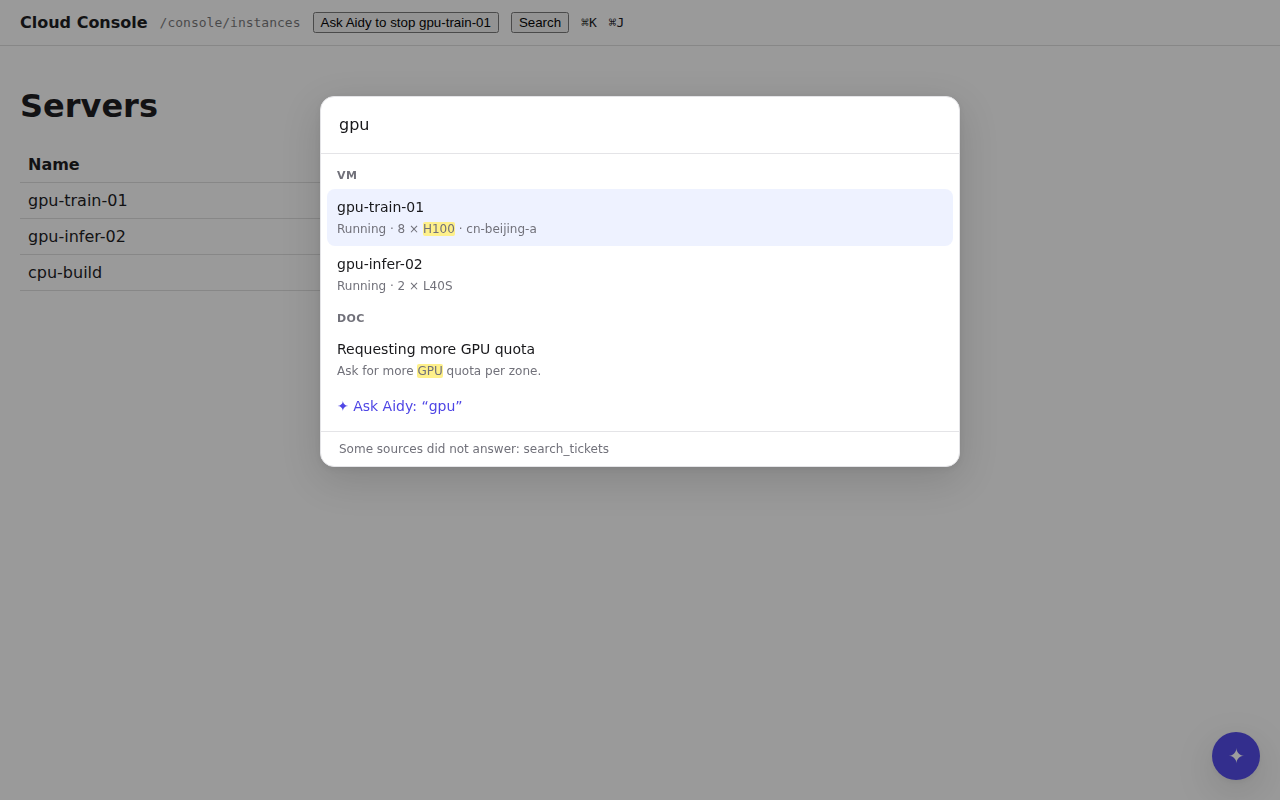
The palette, the agent's `search` tool, MCP and the CLI (`acme search "gpu"`) run the same
search. Each of your `role: search` operations is a source, and your docs, indexed by rungent, are
one more, named `knowledge`.
## Add a search source
A search source is a `GET` with a required `q` query parameter and an optional `limit`:
```json
"/api/vms/search": { "get": { "x-rungent": { "name": "search_vms", "role": "search" } } }
```
`GET /api/vms/search?q=gpu&limit=10` answers its best hits first:
```json
{
"hits": [
{ "type": "vm", "id": "vm-42", "title": "gpu-train-01", "excerpt": "Running · 8 × «H100» · cn-beijing-a",
"url": "/console/instance/vm-42", "updatedAt": "2026-11-19T08:00:00Z" }
]
}
```
| Field | Meaning |
|---|---|
| `type` | Required. A short kind (`vm`, `doc`), for grouping and filtering. |
| `id` | Required. Unique within the type. |
| `title` | Required. |
| `url` | Required. A path in your product, or an absolute URL. |
| `excerpt` | Plain text, at most 300 characters; matches may be wrapped in `«…»`. |
| `updatedAt` | An RFC 3339 time. |
| `content` | The passage itself, at most 4000 characters, for the model only. People never see it. |
rungent calls each source as the user, so your permission checks already filter the hits. `limit`
defaults to 10 and is at most 50.
## One search over every source
rungent asks every source at once, each with its own timeout (2 seconds by default, at most 10, set
with `timeoutSeconds`), and merges the lists by reciprocal rank fusion: a hit's place depends on
the rank each source gave it, so the sources' scores never need to be comparable. A source that
times out or fails is listed in `failed`, and the others still answer.
## Add your docs
With `rungent serve`, two variables index a folder of Markdown at start:
```bash
RUNGENT_KNOWLEDGE_DIR=/srv/docs
RUNGENT_KNOWLEDGE_BASE_URL=https://docs.acme.example.com
```
Every `.md` and `.mdx` file under the folder becomes a page. Its address is the base URL plus its
path without the extension (`deploy/certificates.md` becomes `…/deploy/certificates`, and an
`index` file stands for its folder); its title is the frontmatter `title`, else the first heading.
Unchanged pages are skipped, so a restart is cheap. The base URL may be a path on your product
(`/help`).
## Index docs from code
Embedded, or to choose who sees which docs, use `rungent/knowledge`. It runs on Postgres,
SQLite or D1 and may share rungent's database: its tables start with `rungent_knowledge_`.
```ts
import { readFile } from 'node:fs/promises';
import { createKnowledge } from 'rungent/knowledge';
import { postgresDriver } from 'rungent/sql/postgres';
const knowledge = createKnowledge({ driver: postgresDriver(process.env.DATABASE_URL!) });
await knowledge.migrate();
await knowledge.ingest('docs', [
{
id: 'deploy/certificates',
title: 'Rotate certificates',
url: '/help/deploy/certificates',
markdown: await readFile('docs/deploy/certificates.md', 'utf8'),
},
]);
const rungent = createRungent({
// ...
sources: [knowledge.source({ collections: (identity) => ['docs', `manuals/${identity.tenant}`] })],
});
```
- **`ingest(collection, documents)`** adds or replaces documents and answers
`{ updated, unchanged }`. Run it after each docs build; unchanged documents are skipped, and
sections whose text did not change keep their embeddings. `remove(collection, ids)` deletes
documents your source no longer has.
- **`collections`** receives the user's identity and picks what that user may search, so a
tenant's private manuals stay with that tenant. The source is named `knowledge`; pass `name` to
change it.
- **`embed`** and **`dimensions`** add search by meaning ("cert expiry" finds "Rotate
certificates") with any embedding provider:
```ts
const knowledge = createKnowledge({
driver,
embed: async (texts) =>
(await openai.embeddings.create({ model: 'text-embedding-3-small', input: texts })).data.map((d) => d.embedding),
dimensions: 1536,
});
```
Without an embedder, search works on words alone, Chinese included. Vector search reads at most
the newest 20,000 sections of the searched collections per query.
## Write docs that cite well
rungent splits each page at its h1 to h3 headings, and cuts a section longer than about 800 tokens at
paragraphs. A hit's title is `page title › heading`, and its link is the page address plus the
heading's anchor. Write so that each section answers one question under a heading that names it.
Give a heading an explicit id when its anchor must not change with its wording:
```md
## Rotate certificates {#rotate}
```
## Grounding and citations
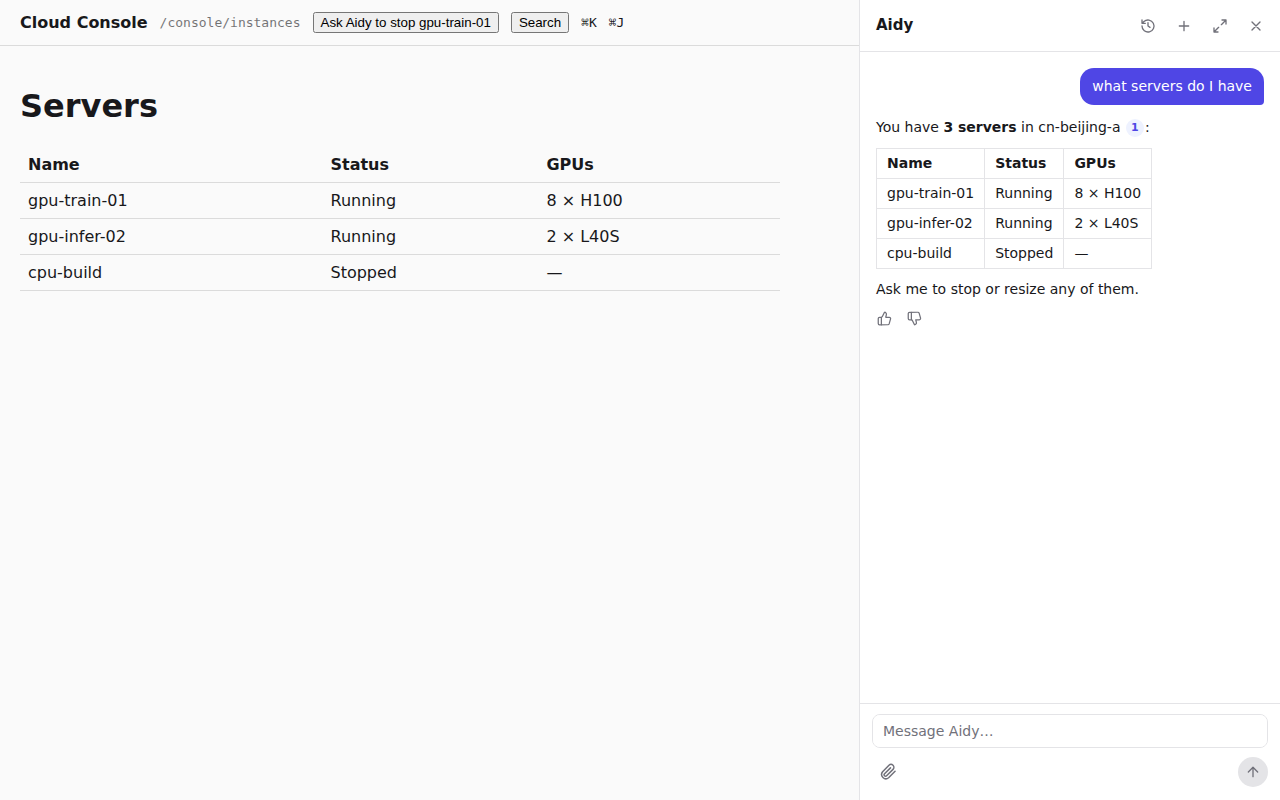
With knowledge, each new user message starts with a search for its text (the first 200
characters, 5 hits) before the model's first step. It is an ordinary `search` call in the
conversation, so the user sees it with the other lookups. The model is told to answer questions
about your product only from tool results and search hits, to search again with other words
when the hits do not answer, and to say so when nothing does. Without knowledge, the agent
searches your `role: search` operations when it needs to find something.
The `search` tool numbers hits from 1 across the run and gives the model their `content`. When an
answer cites `[1]`, the run emits a `rungent.citation` event mapping each number to its hit
(without `content`), and the dock renders it as a link to the hit's `url`.
## Where to go next
[Surfaces](surfaces.md) puts the palette beside the dock, MCP and the CLI.
# Surfaces
*rungent between the surfaces people use and your product's API*
| Surface | Who uses it | What it offers | How a write is confirmed |
|---|---|---|---|
| The dock | Your users, beside your pages | Operations on `agent`, search, forms | An approval card |
| ⌘K palette | Your users | Search over every source | Nothing to confirm |
| MCP (`/mcp`) | Claude Code, Cursor, Codex, other agents | Operations on `mcp`, search | MCP elicitation |
| CLI | People and agents in a terminal | Operations on `cli` or `mcp`, search | `[y/N]`, or `--yes` |
| `skill.md`, `llms.txt` | Agents finding their way in | How to connect, and the operations | Not a caller |
Every surface calls your API [as the user](acting-as-the-user.md) and shows only what that
user's catalog holds. This page is the end user's side; the developer's side of the dock is in
[JavaScript](javascript.md#add-the-dock).
## Which operations appear where
An operation's `surfaces` lists the surfaces that offer it. Reads default to all three; writes to
`agent` and `cli`. So MCP starts read-only, and writes reach a terminal through the CLI, which
asks before each one. Set the list to change that:
```json
{ "name": "stop_vm", "effect": "update", "surfaces": ["agent", "mcp", "cli"] }
```
Role operations appear on no surface; search reaches every surface through the built-in
`search` tool instead.
## The dock
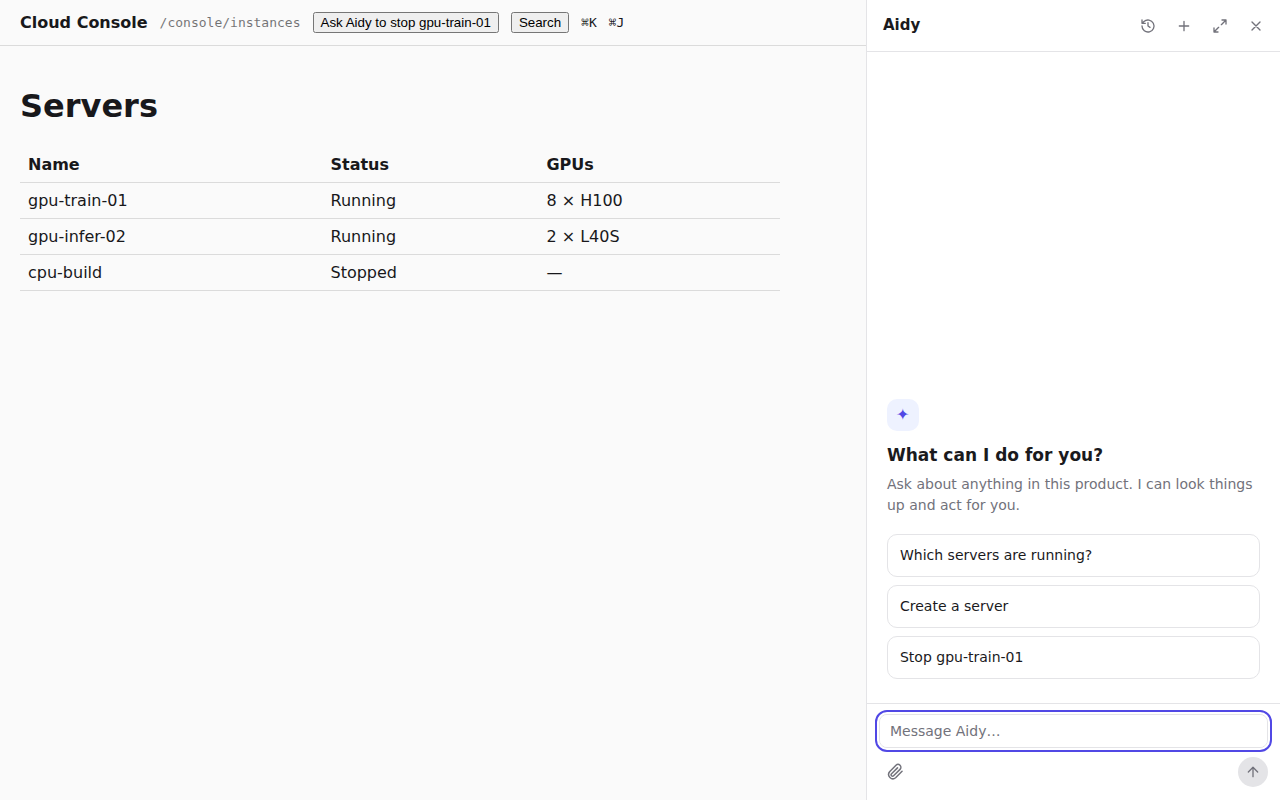
The dock opens beside your page and takes its room from the page instead of covering it, so the
server list the assistant just changed stays in view. ⌘J (Ctrl+J) opens and closes it. The user
drags its edge between 360 and 640 pixels; on a phone it fills the screen, and expanded it shows
the conversation history beside the answer.
An empty conversation offers your suggestions. Text streams in with a caret, lookups show as
short rows ("Looked up 2 things"), and forms, approvals and questions appear in the conversation.
A ring shows how full the context is. What the user is looking at goes with each message, and
pages named by `open` are shown through your router.
## ⌘K search
⌘K (Ctrl+K) opens the palette over every [search source](search.md), grouped by type. Arrow keys
move, Enter opens a hit, and the last row hands the query to the dock as a question.
## MCP for coding agents
Every rungent host serves MCP over streamable HTTP at `/mcp`. A client signs in with a token
your API accepts as the user's (a personal access token, an API key or an OAuth access token),
and gets one tool per operation on `mcp`, plus `search`. rungent forwards the token on every call and
never stores it. Each tool carries hints from its effect (`readOnlyHint`, `destructiveHint`,
`idempotentHint`), and the client receives your skill guide as its instructions unless you set
`mcp.instructions`.
```bash
# Claude Code
claude mcp add --transport http console https://console.example.com/mcp \
--header "Authorization: Bearer $CONSOLE_TOKEN"
# Codex
codex mcp add console --url https://console.example.com/mcp --bearer-token-env-var CONSOLE_TOKEN
```
```jsonc
// Cursor: .cursor/mcp.json
{ "mcpServers": { "console": { "url": "https://console.example.com/mcp",
"headers": { "Authorization": "Bearer ${env:CONSOLE_TOKEN}" } } } }
```
Any other client takes the same three settings: streamable HTTP, the URL, and the
`Authorization` header. A stdio-only client goes through a bridge such as `mcp-remote`.
The simplest way to give users a token is a page in your product where they create one for their
agents, scoped and revocable like any other API token.
### Sign in with OAuth
Clients that support MCP authorization can sign the user in through your OAuth server instead of
a pasted token. Name it with `mcp: { authorizationServers: ['https://auth.example.com'] }`
(`RUNGENT_MCP_AUTHORIZATION_SERVERS` with `rungent serve`). rungent then serves
`/.well-known/oauth-protected-resource/mcp`, and a request to `/mcp` without a valid token answers
`401` with a `WWW-Authenticate` header that points there. The client runs the sign-in and retries
with the access token. Your server issues the tokens and your API checks them; rungent only forwards
them.
### When MCP misbehaves
| What you see | Why, and what to do |
|---|---|
| `401` on connect | No token, or one your identity operation refuses. Check that the variable is set where the client starts. |
| A write is missing from the tools | Writes are on `mcp` only when listed in `surfaces`, and only for users who may use them. |
| `not_executed`, "cannot ask for (elicitation)" | The client cannot show a confirmation. Use one that can, the dock, or the CLI. |
| `404 session_not_found` | The session is gone: idle for 10 minutes, rungent restarted, or the token changed. Behind several replicas, route a session to one replica ([Deploy](deploy.md#run-several-replicas)). |
| OAuth sign-in never starts | Route `/.well-known/oauth-protected-resource/mcp` to rungent along with `/mcp`. |
## A CLI with your name
```bash
acme login https://console.example.com
acme vm stop gpu-train-01
```
```text
Stop server gpu-train-01? [y/N] y
{ "id": "vm-42", "name": "gpu-train-01", "status": "stopped" }
```
The CLI has no commands of its own for your product: it connects to `/mcp`, lists the
operations the signed-in user may use, and turns each into a command. A new operation is a new
command the next time it runs, with nothing to republish. Output is JSON, so agents script it as
easily as people type it; `acme search "gpu"` searches your product and docs.
`rungent brand` writes a small npm package whose bin is your command:
```bash
npx rungent brand --name acme --host https://console.example.com -o acme-cli --npm-name @acme/cli
cd acme-cli && npm publish --access public
```
It reads `ACME_HOST` and `ACME_TOKEN` (or the variables you name with `--env-host` and
`--env-token`), keeps its own logins, and depends on `rungent`, so a new rungent release
reaches it as an ordinary dependency update. Leave out `--host` for a product customers host
themselves. Every flag is in the [CLI reference](cli-reference.md).
`x-rungent.cli` shapes the commands: `{"command": "vm stop", "args": ["vm_id"]}` turns
`acme stop-vm --vm-id vm-42` into `acme vm stop vm-42`, and with `resolve` on `vm_id`,
`acme vm stop gpu-train-01` works too.
## skill.md and llms.txt
rungent serves `/skill.md`, a skill an agent loads to use your product (how to connect, the safety
rules, every operation by area), and `/llms.txt`, the index of the same in the
[llms.txt](https://llmstxt.org) format. Both are generated from the catalog of whoever asks.
Asked without a credential, they list what your OpenAPI shows anonymously, or only how to connect
when your API asks for sign-in.
Tell agents which CLI to install with `skill.cli` in `createRungent`:
```ts
createRungent({
// ...
skill: { cli: { command: 'acme', package: '@acme/cli' }, guide: '…a hand-written guide placed first…' },
});
```
`install` takes a free-form line instead of a package. With `rungent serve`, set `RUNGENT_CLI_COMMAND`
and `RUNGENT_CLI_PACKAGE` or `RUNGENT_CLI_INSTALL`. Without any, the documents name `rungent` from
`rungent`. `rungent docs` writes the same documents as files for your docs site.
Once you ship, a user hands their agent one sentence:
```text
Install the skill at https://console.example.com/skill.md and use it to manage my servers.
```
## Where to go next
[JavaScript](javascript.md) mounts rungent and the dock in your app.
# JavaScript
An embedded rungent is one Web-standard `fetch` handler inside your app. Whatever the framework, the
integration is this:
```ts
import { createRungent } from 'rungent';
const rungent = createRungent({ url, host, signingKey, secret, store, models });
// Route these paths to rungent.fetch(request):
// /rungent/v0/* /mcp /skill.md /llms.txt /.well-known/rungent-keys.json
```
`createRungent` returns `{ fetch(request, ctx?), migrate(), close() }`. It does no I/O until the
first request, which creates rungent's tables; `migrate()` does it ahead of time, and `close()` waits
for runs in progress. rungent ships no framework adapter: the lines below are all of it. The
[Quickstart](quickstart.md) walks through a whole Hono host.
## What createRungent takes
| Option | What it is |
|---|---|
| `url` | **Required.** The public URL rungent is served at, `https://console.example.com`. Signed into every assertion as `iss`. |
| `host.origin` | **Required.** Your product's public origin: the assertion's `aud`, and the start of its `htu`. |
| `host.openapi` | **Required.** Path or URL of your OpenAPI 3.1 document, fetched with each user's credential. |
| `host.fetch` | Your app's own `fetch` (Hono's `app.fetch`), so rungent calls your API in the process. Default: the global `fetch`. |
| `host.baseUrl` | Where rungent reaches your API over the network (`http://127.0.0.1:3000`). Default: `host.origin`. |
| `signingKey` | **Required.** rungent's Ed25519 key, from `importSigningKey`. See [Keys and rotation](acting-as-the-user.md#keys-and-rotation). |
| `secret` | **Required.** 32 bytes or more; seals the model API keys admins save. A list rotates it: the first seals, every one unseals. |
| `store` | **Required.** Where conversations, approvals and settings live. See [Choose a store](#choose-a-store). |
| `models` | **Required.** `{ chain }`, the default model chain. See [Choose models](deploy.md#choose-models). |
| `name` | The assistant's name. Default `Assistant`. |
| `instructions` | Product facts added to the system prompt: a string, or a function of the user's identity. |
| `product` | `{ name, summary? }` for `/skill.md` and `/llms.txt` when a signed-out caller cannot read your OpenAPI. |
| `basePath` | Serve every route below a prefix. See [Serve rungent under a prefix](#serve-rungent-under-a-prefix). |
| `sources` | More search sources, such as your docs. See [Search and knowledge](search.md#index-docs-from-code). |
| `hostKeys` | Public keys your API signs `Rungent-Host-Assertion` with. See [HTTP API](http-api.md#host-assertions). |
| `skill` | `{ name?, guide?, cli? }` for `/skill.md`. See [Surfaces](surfaces.md#skill-md-and-llms-txt). |
| `limits` | `{ maxSteps, contextTokens, runTimeoutSeconds }`. Defaults 16, 128 000 and 600. |
| `mcp` | `{ authorizationServers?, instructions? }`. See [Surfaces](surfaces.md#sign-in-with-oauth). |
## Mount it on Hono
Give rungent your app's `fetch` and mount the paths. Its calls never leave the process; each arrives
at your routes as a request to `host.origin`.
```ts
const rungent = createRungent({
url: 'https://console.example.com',
host: { origin: 'https://console.example.com', openapi: '/api/openapi.json', fetch: app.fetch },
// signingKey, secret, store, models …
});
for (const path of ['/rungent/v0/*', '/mcp', '/skill.md', '/llms.txt', '/.well-known/rungent-keys.json']) {
app.all(path, (c) => rungent.fetch(c.req.raw));
}
```
rungent refuses a mutating request the browser marks `Sec-Fetch-Site: cross-site`, and under
`/rungent/v0` a body that is not `application/json`, so a cookie session cannot be driven from
another site.
## Mount it on Express
`nodeHandler(rungent)` from `rungent/node` adapts rungent to Node's `(req, res)`. Register it
before any body parser: rungent reads the raw body itself.
```ts
import express from 'express';
import { createRungent } from 'rungent';
import { nodeHandler } from 'rungent/node';
const app = express();
const rungent = createRungent({
url: 'https://console.example.com',
host: { origin: 'https://console.example.com', baseUrl: 'http://127.0.0.1:3000', openapi: '/api/openapi.json' },
// signingKey, secret, store, models …
});
app.all(['/rungent/v0/*splat', '/mcp', '/skill.md', '/llms.txt', '/.well-known/rungent-keys.json'], nodeHandler(rungent));
app.use(express.json({ verify: (req, _res, buf) => { (req as { rawBody?: Buffer }).rawBody = buf; } }));
// … your routes
app.listen(3000);
```
The patterns are Express 5 syntax. Express has no in-process `fetch`, so rungent calls your API over
loopback at `host.baseUrl`. When you verify the assertion, rebuild its URL from the public origin
(`https://console.example.com${req.originalUrl}`) and hash `rawBody`, the exact bytes received.
On shutdown, `await rungent.close()` lets runs in progress finish.
## Mount it on Cloudflare Workers
Bindings arrive with each request, so build rungent once per isolate on the first one, and pass the
execution context: a run then keeps going with `waitUntil` after its response closes.
```ts
import { createRungent, SqlStore, type Rungent } from 'rungent';
import { importSigningKey } from 'rungent/delegation';
import { d1Driver } from 'rungent/sql/d1';
let rungent: Promise | undefined;
const rungentFor = (env: Env) =>
(rungent ??= importSigningKey(JSON.parse(env.RUNGENT_SIGNING_KEY)).then((signingKey) =>
createRungent({
url: 'https://console.example.com',
host: { origin: 'https://console.example.com', openapi: '/api/openapi.json', fetch: (request) => app.fetch(request, env) },
signingKey,
secret: env.RUNGENT_SECRET,
store: new SqlStore(d1Driver(env.DB)),
models: { chain: [{ id: 'main', provider: 'openai', model: 'gpt-4.1-mini', apiKey: env.OPENAI_API_KEY }] },
}),
));
for (const path of ['/rungent/v0/*', '/mcp', '/skill.md', '/llms.txt', '/.well-known/rungent-keys.json']) {
app.all(path, async (c) => (await rungentFor(c.env)).fetch(c.req.raw, c.executionCtx));
}
```
Keep `RUNGENT_SIGNING_KEY` and `RUNGENT_SECRET` as Worker secrets (`wrangler secret put`). `waitUntil`
still ends with the request's time limits, and every isolate has its own MCP sessions. In
production, route each user to a Durable Object that builds the rungent instance the same way and
calls `rungent.fetch(request, this.ctx)`: the object keeps running while a run streams, and one
user's requests meet in one place.
## Choose a store
| Store | Use it for |
|---|---|
| `new SqlStore(postgresDriver(url))`, driver from `rungent/sql/postgres` | Production, and several processes sharing one database. Needs the `postgres` package. |
| `new SqlStore(sqliteDriver('rungent.sqlite'))`, from `rungent/sql/sqlite` | One process on Node, with the built-in `node:sqlite`. |
| `new SqlStore(d1Driver(env.DB))`, from `rungent/sql/d1` | Cloudflare Workers. Run `migrate()` from one place, such as a deploy step. |
| `new MemoryStore()` | Development and tests: it forgets everything on restart. |
`SqlStore` and `MemoryStore` come from `rungent`. rungent keeps its own `rungent_*` tables and
creates or upgrades them on the first request; give it its own database or schema.
`postgresDriver` also takes an existing `postgres` client.
For development, `generateKeyPair('dev')` from `rungent/delegation` makes a key in memory
(`signingKey: (await generateKeyPair('dev')).signing`). In production, load the generated private
JWK with `importSigningKey(JSON.parse(process.env.RUNGENT_SIGNING_KEY!))`.
## Serve rungent under a prefix
To serve rungent at `/assistant`, set `basePath: '/assistant'` and
`url: 'https://console.example.com/assistant'`. Every route moves below the prefix, so one
`app.all('/assistant/*', …)` mounts it, and the web client takes the prefix:
`createClient({ baseUrl: '/assistant' })`.
## Add the dock
Mount the dock once, in the web app's root layout, around the area your pages render in. It then
stays put, with its conversation, while the user moves between pages.
```tsx
// web/RootLayout.tsx
import { createClient } from 'rungent/client';
import { RungentDock, RungentProvider, SearchPalette } from 'rungent/react';
import 'rungent/react/styles.css';
const client = createClient();
export function RootLayout({ children }: { children: React.ReactNode }) {
const navigate = useNavigate();
return (
['Which servers are running?', 'Create a server']}
context={() => [{ description: 'The page the user is on', value: location.pathname }]}
>
{children}
);
}
```
The components need React 19. `createClient()` talks to the page's own origin, and the browser's
cookies sign the user in. An app that keeps an access token passes it on every request with
``createClient({ headers: async () => ({ Authorization: `Bearer ${await getToken()}` }) })``;
`baseUrl` points at another origin or a prefix.
### Props that matter
| `RungentProvider` prop | What it is |
|---|---|
| `client` | The client above. |
| `forms` | Your page's own form components, by operation name. See [Forms and approvals](forms-and-approvals.md#show-your-page-s-own-form). |
| `onOpen` | `(path) => void`: your router, for pages the assistant opens and links in answers. Same-origin paths only; without it, rungent sets `window.location`. |
| `locale` | rungent's own text: `zh-CN` has its own strings, any other tag speaks English. Pick it from your app's language setting. `strings` overrides any string by key (`{ assistant: 'Copilot' }`). |
| `theme` | `'light'`, `'dark'` or `'system'` (the default). |
| `context` | `() => {description, value}[]`, called as each run starts: what the user is looking at, so "stop this one" means the server on screen. |
| `suggestions` | `() => string[]`: questions an empty conversation offers, for example per page. |
| `upload` | `(file) => Promise<{url, mimeType, name}>`: stores a file the user attaches. Without it, the composer offers no attachments. |
`RungentDock` takes `open`/`onOpenChange` to control it, `onLayoutChange` (told `'closed'`,
`'panel'` or `'expanded'`, for example to fold your navigation), and `launcher={false}` when
your product has its own button. `useDock().ask(text)` opens it on a new conversation that starts
with that message. Under a fixed header, set `--rungent-dock-top` to the header's height. On a page
whose layout you do not own, render `` without children: the panel is then fixed at
the window's edge.
### ⌘K and styles
`SearchPalette` opens on ⌘K; `useSearchPalette().open()` opens it from a search button, since
phones have no ⌘K. Every color and size is a CSS variable on `.rungent-root`:
```css
.rungent-root {
--rungent-accent: #0f766e;
--rungent-accent-fg: #ffffff;
--rungent-radius: 6px;
--rungent-font: Inter, system-ui, sans-serif;
}
.rungent-root[data-rungent-theme='dark'] { --rungent-accent: #2dd4bf; }
```
The components' styles set what they rely on, so a CSS reset such as Tailwind's preflight does
not change them. For a conversation UI of your own, `useThread`, `useThreads`, `useSearch`,
`useCatalog`, `RungentThread`, `ApprovalCard` and `RungentForm` are exported too; the events behind
them are in [HTTP API](http-api.md#events).
## Where to go next
- [Deploy](deploy.md#choose-models): the model chain, and the admin page that changes it.
- [Testing](testing.md): check every surface against your deployment.
# Python and other stacks
rungent's runtime is TypeScript, so an API in another language runs it as its own process,
`rungent serve`. A reverse proxy sends rungent's paths to it and everything else to your API, so the
browser sees one origin and the user's session works for both.
```text
browser ─> proxy :8000 ─┬─ /rungent/v0/*, /mcp, /skill.md, … ─> rungent serve :8787 ─┐
└─ everything else ────────────────> your API :8001 <──┘ calls as the user
```
Your API implements a small contract over HTTP. In Python, the `rungent` kit on PyPI (imported as `rungent`) does most of
it; in any other language it is a few dozen lines.
| Your API | Required |
|---|---|
| Serves OpenAPI 3.1 with `x-rungent` on the operations agents may use | Yes |
| Answers one identity operation: who the credential belongs to | Yes |
| Verifies the `Rungent-Assertion` header on calls from rungent | Yes |
| Answers search operations over its resources | No |
## Annotate a FastAPI app
```bash
pip install "rungent[fastapi]"
```
The kit needs Python 3.12 or later. `op()` builds the `x-rungent` object for FastAPI's
`openapi_extra`. It takes the [x-rungent](x-rungent.md) keys in snake case (`timeout_seconds` becomes
`timeoutSeconds`; nested objects keep the wire's camelCase) and raises `ValueError` at import,
listing every problem, when one is wrong.
```python
# app.py
from fastapi import FastAPI, Request
from pydantic import BaseModel
from rungent import Identity, op
app = FastAPI(title="Cloud Console")
class Vm(BaseModel):
id: str
name: str
status: str
@app.get("/api/vms", openapi_extra=op("list_vms", description="List cloud servers (VMs) and their status."))
async def list_vms(request: Request) -> list[Vm]:
return find_vms(current_user(request))
@app.post(
"/api/vms/{vm_id}/stop",
openapi_extra=op(
"stop_vm",
description="Stop a running cloud server (VM).",
effect="update",
resolve={"vm_id": {"op": "list_vms"}},
confirmation={"title": "Stop server {vm_id}?"},
cli={"command": "vm stop", "args": ["vm_id"]},
),
)
async def stop_vm(vm_id: str, request: Request) -> Vm:
return stop(current_user(request), vm_id)
@app.get("/api/me", openapi_extra=op("whoami", role="identity"))
async def whoami(request: Request) -> Identity:
user = current_user(request)
return Identity(subject=user.id, tenant=user.tenant_id, name=user.name)
```
FastAPI serves the document at `/openapi.json`. `Identity`, like the search and form models
below, serializes in the wire's camelCase and leaves absent fields out. `ADMIN_SCOPE`
(`rungent:admin`) in `scopes` lets a user change rungent's model settings.
## Verify the assertion
`RungentHost` installs the six checks of [Acting as the user](acting-as-the-user.md#verify-the-assertion)
as one middleware. It matches the operation from the route FastAPI dispatches to, and its
approval from the operation's `approval` key.
```python
import json
import os
from rungent import load_public_keys
from rungent.fastapi import RungentCall, RungentHost
def caller(request: Request) -> tuple[str, str | None] | None:
"""(subject, tenant) of the request's credential, as your UI authenticates it."""
user = current_user(request)
return (user.id, user.tenant_id) if user else None
RungentHost(
app,
keys=load_public_keys([json.loads(os.environ["RUNGENT_PUBLIC_JWK"])]),
audience="https://console.example.com",
identity=caller,
)
@app.post("/api/vms/{vm_id}/stop", openapi_extra=op("stop_vm", effect="update"))
async def stop_vm(vm_id: str, request: Request, rungent: RungentCall) -> Vm:
if rungent is not None: # the call came through rungent, approved by the user
audit(actor="rungent", user=rungent.sub, run=rungent.rid, approval=rungent.apr)
return stop(current_user(request), vm_id)
```
`audience` is your public origin, the same as rungent's `RUNGENT_HOST_ORIGIN`. A request without the
header passes untouched; one that fails a check gets
`401 {"detail": "rungent_assertion_invalid", "code": ""}`. `RungentCall` is the verified
`AssertionClaims` (`sub`, `ten`, `op`, `rid`, `cid`, `sid`, `apr`, …) or `None` for a direct user
call. An `HTTPException` your `identity` function raises is answered as it is.
| `RungentHost` option | Use it when |
|---|---|
| `public_url="https://console.example.com/gw"` | A proxy strips a path prefix before FastAPI. The URL the assertion binds is rebuilt as `public_url` plus the raw path and query; it defaults to `audience`. |
| `replay_cache=Redis.from_url("redis://cache:6379/0")` | You run several workers or replicas. Anything with redis-py's `set(key, value, *, nx=True, ex=seconds)`, sync or async; the default `MemoryReplayCache()` lives in one process. |
| `openapi=lambda: catalog_document` | The app is a gateway with no route per operation. Operations are then matched by method and path template against that document; forward requests upstream with `strip_rungent_headers(request.headers)`. |
During a key rotation, pass both public keys to `load_public_keys`.
## Search and form operations
A `role="search"` operation answers `SearchResponse`; rungent calls it as the user, so return only
what that user may see ([Search and knowledge](search.md#add-a-search-source)):
```python
from rungent import SearchHit, SearchResponse
@app.get("/api/vms/search", openapi_extra=op("search_vms", role="search"))
async def search_vms(request: Request, q: str, limit: int = 10) -> SearchResponse:
return SearchResponse(hits=[
SearchHit(type="vm", id=vm.id, title=vm.name, url=f"/console/instance/{vm.id}", content=vm.description)
for vm in find_vms(current_user(request), q, limit)
])
```
A `role="form"` operation receives the arguments known so far and answers a `Form`
([Forms and approvals](forms-and-approvals.md#declare-the-form)):
```python
from typing import Any
from rungent import ChoiceQuestion, Form, FormOption, TextQuestion
@app.post("/api/vms/form", openapi_extra=op("vm_form", role="form"))
async def vm_form(args: dict[str, Any]) -> Form:
return Form(
prompt="Create a server",
questions=[
TextQuestion(id="name", prompt="Name", required=True),
ChoiceQuestion(id="zone_id", prompt="Zone", required=True,
options=[FormOption(id=z.id, label=z.name) for z in await list_zones()]),
],
)
@app.post("/api/vms", openapi_extra=op("create_vm", description="Create a cloud server (VM).", form="vm_form"))
async def create_vm(body: VmSpec, request: Request) -> Vm: ...
```
## The Python kit at a glance
Everything imports from `rungent`, except the FastAPI integration in `rungent.fastapi`.
| Name | What it is |
|---|---|
| `op(name, **keys)` | `{"x-rungent": {...}}` for `openapi_extra`, checked against the x-rungent schema. Typed nested objects: `Confirmation`, `Reference`, `Next`, `Cli`. |
| `RungentHost`, `RungentCall` | The assertion middleware, and the dependency that hands a route its verified claims. |
| `Identity`, `ADMIN_SCOPE` | The identity answer; `"rungent:admin"`. |
| `SearchHit`, `SearchResponse` | The search answer: at most 50 hits, `excerpt` ≤ 300 and `content` ≤ 4000 characters. |
| `Form`, `TextQuestion`, `ChoiceQuestion`, `FormOption` | The generic form: 1 to 24 questions with unique ids. |
| `load_public_keys(jwks)` | Public keys by `kid` from the JWKs `rungent keys generate` prints. |
| `verify_assertion(token, *, keys, audience, method, url, body, remember)` | The signature, lifetime, audience, request and replay checks, without FastAPI; `url` is the full URL as sent, `body` the exact bytes. |
| `check_call(claims, *, subject, tenant, op, approval)` | The user, operation and approval checks. |
| `RungentAssertionError` | Raised by both, with `code`: the check that failed. |
| `args_hash`, `canonical_json` | The hash an approval binds to, as in TypeScript. |
| `strip_rungent_headers(headers)` | A copy without `Rungent-Assertion` and `Rungent-Host-Assertion`. |
Failure codes: `malformed`, `unknown_key`, `bad_signature`, `expired`, `not_yet_valid`,
`too_long`, `audience`, `method`, `url`, `body`, `replay`, `subject`, `tenant`, `operation`,
`approval_missing`.
## Any other language
Acahti, written in Go, implements the contract in its own code. Keep the OpenAPI generator you
have (swag, springdoc, a hand-written file): it only has to pass `x-rungent` through. The identity
operation answers `{"subject": "u_123", "tenant": "t_9", "name": "Ada Lovelace"}`. Then verify
the assertion, rejecting the request with `401` and `rungent_assertion_invalid` unless every check
holds:
| Check | Holds when |
|---|---|
| Signature | The header is `{"alg":"EdDSA","typ":"rungent-call+jwt","kid":…}` and the signature verifies with the pinned key of that `kid` |
| Lifetime | `exp - iat` ≤ 60, `exp` has not passed by more than 60 seconds, and `iat` is not more than 60 seconds ahead |
| Audience | `aud` is your public origin |
| Request | `htm` is the method; `htu` is your public origin followed by the path and query as received; `bsh` is the base64url SHA-256 of the exact body bytes |
| Replay | `jti` was not seen before; keep it until `exp` plus the skew, shared by every process |
| User | `sub`, and `ten` when present, equal the identity your API resolved from the credential |
| Operation | `op` is the `x-rungent.name` of the operation that serves this method and path |
| Approval | When that operation needs approval (every write, by default), `apr` is present |
The two cryptographic checks, in Go's standard library:
```go
// keys: kid → ed25519.PublicKey, decoded from the base64url "x" of each pinned JWK.
func verifySignature(token string, keys map[string]ed25519.PublicKey) (claims []byte, err error) {
parts := strings.Split(token, ".")
if len(parts) != 3 {
return nil, errInvalid
}
raw, err := base64.RawURLEncoding.DecodeString(parts[0])
var header struct{ Alg, Kid, Typ string }
if err != nil || json.Unmarshal(raw, &header) != nil || header.Alg != "EdDSA" || header.Typ != "rungent-call+jwt" {
return nil, errInvalid
}
key, ok := keys[header.Kid]
sig, err := base64.RawURLEncoding.DecodeString(parts[2])
if !ok || err != nil || !ed25519.Verify(key, []byte(parts[0]+"."+parts[1]), sig) {
return nil, errInvalid
}
return base64.RawURLEncoding.DecodeString(parts[1])
}
// bsh: the body exactly as received, before any parsing.
func bodyHash(body []byte) string {
sum := sha256.Sum256(body)
return base64.RawURLEncoding.EncodeToString(sum[:])
}
```
For `htu`, use the public origin even when rungent reaches you on an internal address (in Go,
`origin + r.URL.RequestURI()`).
## Run rungent serve beside your API
Make a signing key first. The command prints the public JWK, for your API, and writes the private
one, for rungent, to a new file:
```bash
npx rungent keys generate --kid rungent-dev -o rungent-dev.private.jwk > rungent-dev.public.jwk
RUNGENT_URL=http://localhost:8000 \
RUNGENT_HOST_ORIGIN=http://localhost:8000 \
RUNGENT_HOST_BASE_URL=http://localhost:8001 \
RUNGENT_HOST_OPENAPI=/openapi.json \
RUNGENT_SIGNING_KEY="$(cat rungent-dev.private.jwk)" \
RUNGENT_SECRET="a development secret of 32 bytes or more" \
RUNGENT_DATABASE_URL=sqlite:rungent.sqlite \
RUNGENT_MODELS='[{"id":"main","provider":"openai","model":"gpt-4.1-mini","apiKey":"sk-…"}]' \
PORT=8787 \
npx rungent serve
```
`RUNGENT_HOST_ORIGIN` is the origin the browser sees; `RUNGENT_HOST_BASE_URL` is where rungent reaches
your API. `rungent serve` needs Node.js 24; the Docker image `ghcr.io/rungent/rungent-server` runs the
same server. Every variable is in [Deploy](deploy.md#configure-it).
## Put both behind one origin
Any reverse proxy works. In development, Caddy does it in a few lines:
```text
# Caddyfile
:8000 {
@rungent path /rungent/* /mcp /skill.md /llms.txt /.well-known/rungent-keys.json
handle @rungent {
reverse_proxy localhost:8787
}
handle {
reverse_proxy localhost:8001
}
}
```
The nginx version for production is in [Deploy](deploy.md#route-the-rungent-paths). Then check it
with a token your API accepts:
```bash
npx rungent check --openapi http://localhost:8001/openapi.json
curl -H "Authorization: Bearer $TOKEN" http://localhost:8000/skill.md
RUNGENT_HOST=http://localhost:8000 RUNGENT_TOKEN=$TOKEN npx rungent vm stop vm-42
```
`/skill.md` lists `list_vms` and `stop_vm`. The CLI asks you to confirm, then rungent calls
`POST /api/vms/vm-42/stop` as you. For the dock in your pages, add it exactly as in
[JavaScript](javascript.md#add-the-dock), served from `:8000`.
## Where to go next
- [Deploy](deploy.md): the Docker image, Postgres, keys and the proxy in production.
- [Testing](testing.md): check the contract end to end against your API.
# Deploy
An embedded rungent deploys with your JavaScript app; its options are on [JavaScript](javascript.md).
Beside an API in any other language, rungent runs as its own service, `rungent serve`, configured from
environment variables, with its state in Postgres, behind the reverse proxy that already serves
your product.
```text
browser ─> reverse proxy (console.example.com)
├─ /rungent/v0/*, /mcp, /skill.md, /llms.txt, /.well-known/… ─> rungent serve ─> Postgres
└─ everything else ──────────────────────────────────────> your API
rungent serve ─(the user's credential + Rungent-Assertion)─> your API
```
## Run it
```bash
docker run -d --name rungent -p 8080:8080 --env-file rungent.env ghcr.io/rungent/rungent-server:v0.4.0
```
Images are tagged with each release (`v0.4.0`) and `latest`. The image runs `rungent serve` as the
`node` user on port 8080. Without Docker, `npx rungent serve` runs the same server on
Node.js 24.
`GET /healthz` answers `ok`, at the root even when rungent is served below a prefix; the image's
health check calls it. On `SIGTERM` the server stops taking requests, lets runs in progress
finish and exits. To build on your own base image, pass `--build-arg BASE_IMAGE=… --build-arg RUNGENT_VERSION=0.4.0`
to the `Dockerfile` in `packages/rungent` of the rungent repository.
## Configure it
Five variables are required:
| Variable | What it is |
|---|---|
| `RUNGENT_URL` | The public URL rungent is served at, the assertion's `iss`. `https://console.example.com` when the proxy serves rungent at the root. |
| `RUNGENT_HOST_ORIGIN` | Your product's public origin, the assertion's `aud`. Your API verifies against it. |
| `RUNGENT_SIGNING_KEY` | rungent's private Ed25519 JWK with a `kid`, as JSON: the file `rungent keys generate` wrote. |
| `RUNGENT_SECRET` | 32 bytes or more (`openssl rand -base64 48`). Seals the model API keys admins save. |
| `RUNGENT_DATABASE_URL` | `postgres://…`, or `sqlite:` for a single instance on a persistent volume. |
The rest are optional:
| Variable | What it is |
|---|---|
| `RUNGENT_HOST_BASE_URL` | Where rungent reaches your API, when not through the public origin (`http://api.internal:8000`). Assertions still name the public origin. |
| `RUNGENT_HOST_OPENAPI` | Path or URL of your OpenAPI 3.1 document. Default `/api/openapi.json`. |
| `RUNGENT_MODELS` | The default [model chain](#choose-models), a JSON array. Without it, runs fail until an admin saves a chain. |
| `RUNGENT_NAME` | The assistant's name. Default `Assistant`. |
| `RUNGENT_INSTRUCTIONS` | Product facts added to the system prompt; `@/path/to/file` reads a file. |
| `RUNGENT_PRODUCT_NAME`, `RUNGENT_PRODUCT_SUMMARY` | Your product's name and summary in `/skill.md` and `/llms.txt` for signed-out callers, when your OpenAPI needs a sign-in. |
| `RUNGENT_SKILL_NAME`, `RUNGENT_SKILL_GUIDE` | The `name` in `/skill.md`, and a hand-written guide placed first (or `@path`). |
| `RUNGENT_CLI_COMMAND`, `RUNGENT_CLI_PACKAGE`, `RUNGENT_CLI_INSTALL` | Your branded CLI that the documents name: its command, its npm package, or a free-form install line (which wins). The last two need the first. |
| `RUNGENT_MCP_INSTRUCTIONS` | What MCP clients receive on `initialize`, or `@path`. Default: the skill guide. |
| `RUNGENT_MCP_AUTHORIZATION_SERVERS` | Comma-separated OAuth issuers advertised to MCP clients. |
| `RUNGENT_KNOWLEDGE_DIR`, `RUNGENT_KNOWLEDGE_BASE_URL` | Markdown docs indexed at start, and the URL their pages live under. See [Search and knowledge](search.md#add-your-docs). |
| `RUNGENT_HOST_KEYS` | A JSON array of public JWKs your API signs `Rungent-Host-Assertion` with. |
| `RUNGENT_PREVIOUS_SECRET` | The secret before a rotation. |
| `RUNGENT_BASE_PATH` | A prefix for every route, when rungent is served below a path. |
| `RUNGENT_MAX_STEPS` | Model steps per run. Default 16. |
| `PORT` | The listening port. Default 8080. |
A variable that is missing, not valid JSON or out of range stops the server at start with a
message naming it, and exit code 2. Keep `RUNGENT_SIGNING_KEY`, `RUNGENT_SECRET`,
`RUNGENT_PREVIOUS_SECRET`, `RUNGENT_DATABASE_URL` and `RUNGENT_MODELS` (it holds API keys) in your secret
store.
## Database and secrets
Use Postgres in production. rungent keeps conversations, approvals, deferred tasks, settings and the
knowledge index there, in its own `rungent_*` tables, which it creates and upgrades at start. Give it
its own database or schema. SQLite cannot be shared by replicas.
The signing key and its rotation are on [Acting as the user](acting-as-the-user.md#keys-and-rotation).
To rotate the settings secret, set the new value as `RUNGENT_SECRET` and the old one as
`RUNGENT_PREVIOUS_SECRET` and deploy: the new secret seals, both unseal, and saved settings are
sealed again with the new one when first read. Once any run has read them, remove
`RUNGENT_PREVIOUS_SECRET`. Settings sealed with a secret rungent no longer has answer
`503 settings_unreadable` until an admin calls `DELETE /rungent/v0/settings`.
## Route the rungent paths
Send these paths on your product's origin to rungent, unchanged, and everything else to your API:
| Path | What it serves |
|---|---|
| `/rungent/v0/*` | The assistant's HTTP API and its event streams |
| `/mcp` | MCP over streamable HTTP |
| `/skill.md`, `/llms.txt` | Documents generated from your catalog |
| `/.well-known/rungent-keys.json` | rungent's public keys |
| `/.well-known/oauth-protected-resource/mcp` | Only with `RUNGENT_MCP_AUTHORIZATION_SERVERS` |
Runs stream server-sent events, so turn off response buffering and allow long reads. With nginx:
```nginx
location ~ ^/(rungent/v0/|mcp$|skill\.md$|llms\.txt$|\.well-known/(rungent-keys\.json|oauth-protected-resource/mcp)$) {
proxy_pass http://rungent:8080;
proxy_http_version 1.1;
proxy_set_header Host $host;
proxy_buffering off;
proxy_read_timeout 1h;
}
```
Forward the `Authorization` and `Cookie` headers untouched: they are the user's credential. To
serve rungent below `/assistant`, set `RUNGENT_BASE_PATH=/assistant` and
`RUNGENT_URL=https://console.example.com/assistant`, proxy `/assistant/`, and give the web client
`createClient({ baseUrl: '/assistant' })`.
## Run several replicas
Several replicas can share one Postgres: an approval runs once, and one conversation is never
driven by two replicas at a time. Two things stay in one replica's memory:
- **MCP sessions.** Route every request with the same `Mcp-Session-Id` to the same replica
(sticky sessions, or `sessionAffinity: ClientIP` on a Kubernetes Service). Elsewhere it gets
`404 session_not_found`, and the client opens a new session.
- **Model rests.** Each replica learns on its own that a model endpoint is failing.
On Kubernetes, run the image as a Deployment with its variables from a Secret:
```yaml
containers:
- name: rungent
image: ghcr.io/rungent/rungent-server:v0.4.0
ports: [{ containerPort: 8080 }]
envFrom: [{ secretRef: { name: rungent-env } }]
readinessProbe: { httpGet: { path: /healthz, port: 8080 } }
```
## Choose models
rungent calls models through a **chain**: endpoints tried in order. When the first is out of credit
or rate-limited, the same turn goes on with the next, and the user sees at most "Model busy,
retrying". The chain you configure is the default; an admin can replace it at run time.
```ts
createRungent({
// ...
models: {
chain: [
{ id: 'qwen', provider: 'openai-compatible', model: 'qwen3-max',
baseURL: 'https://dashscope.aliyuncs.com/compatible-mode/v1', apiKey: process.env.DASHSCOPE_API_KEY },
{ id: 'claude', provider: 'anthropic', model: 'claude-sonnet-4-5', apiKey: process.env.ANTHROPIC_API_KEY, vision: true },
],
},
});
```
With `rungent serve`, `RUNGENT_MODELS` holds the same array as JSON.
| Field | What it is |
|---|---|
| `id` | Required, unique in the chain, 1 to 64 characters. Saved settings keep an endpoint's key by it. |
| `provider` | `openai-compatible` (any OpenAI-style chat API: DashScope, DeepSeek, vLLM, LiteLLM), `openai` or `anthropic`. |
| `model` | The provider's model id. |
| `baseURL` | Required for `openai-compatible`; for the others, a proxy or gateway. |
| `apiKey` | The provider's key. Without it, `openai` and `anthropic` read `OPENAI_API_KEY` and `ANTHROPIC_API_KEY`. |
| `vision` | The model reads images. Turns with images go to these endpoints first; others get a note in place of each image. |
| `temperature`, `maxOutputTokens` | Sent with every call to this endpoint. |
| `cooldownSeconds` | `{ quota?, rateLimit?, error? }`: how long a failing endpoint rests. |
| `providerOptions` | Passed to the provider, keyed by provider name. `{ 'openai-compatible': { enable_thinking: false } }` keeps Qwen's reasoning models fast. |
Embedded, an entry may also be any AI SDK language model, `{ id, languageModel }`, such as
Workers AI through `agents/models/ai-sdk`. It exists only in code; the settings show it read-only.
### When a model fails
A timeout, `408`, `5xx`, network error or unusable answer is retried on the same endpoint, up to
4 attempts. Any other failure, and the last retry, moves the step to the next endpoint, and the
failing one rests:
| Failure | Rests for | `cooldownSeconds` key |
|---|---|---|
| Out of quota: `402`, or an answer that mentions quota | 6 hours | `quota` |
| Rate limited: `429` | 60 seconds | `rateLimit` |
| Anything else | 5 minutes | `error` |
When every endpoint rests, the run ends with `model_unavailable`. Rests live in one process. A
text-only model first and a vision model further down keeps ordinary turns cheap and still reads
the screenshots users attach.
### Let admins change the chain
Render `ModelSettings` from `rungent/react` on a page only admins reach. Admins add,
remove and reorder endpoints; a key is write-only, and **Reset to defaults** goes back to the
chain you configured. Saving needs the `rungent:admin` scope in the user's identity, checked on the
server. The same is `GET`, `PUT` and `DELETE /rungent/v0/settings` ([HTTP API](http-api.md#settings)).
Saved keys are sealed with `secret` before they reach the database.
## Check it
- `npx rungent check --openapi https://console.example.com/api/openapi.json` passes.
- `GET /rungent/v0/catalog` with a user's token lists that user's operations.
- A write through the dock shows an approval card, and your API logs `actor = rungent` with the
approval id.
- `/skill.md` renders, and a coding agent connects to `/mcp`.
## Where to go next
[Testing](testing.md) measures the agent against your deployment.
# Testing
```bash
argos run pack:rungent --env acme-staging
```
rungent ships an end-to-end suite for any product that integrates it: the
[Argos](https://argos.benchyard.com/skill.md) pack `rungent`, in the `argos/` directory of rungent's
repository. You describe your deployment once, as a **target**, and write a few **scenarios**:
requests to the assistant and what a good run looks like. The suite runs them against your real
API with a test user.
- ContractDeterministic checks with no model: catalog, identity, documents, sign-in, MCP, the CLI and search. About a minute.
- AgentEach scenario runs a few times through the real model. The suite answers forms and approvals itself and records every event.
- ScoreEach attempt is scored: right tools, valid arguments, approval before every write, the form shown, real citations, time and tokens.
- VerdictThe aggregate is compared with thresholds; a missed one fails the run.
## Install the suite
The suite needs Python 3.12 or later, `argospy` 0.7 or later (the
[Argos skill](https://argos.benchyard.com/skill.md) says where to get it), and Node 22 for the CLI
case. Install the pack from a checkout of rungent into a virtual environment of its own:
```bash
uv venv ~/.venvs/rungent-argos
VIRTUAL_ENV=~/.venvs/rungent-argos uv pip install argospy -e rungent/argos
~/.venvs/rungent-argos/bin/argos list pack:rungent
```
## Describe your product as a target
A target is a directory with a `target.env` and a `scenarios.yaml`. Keep yours in your own
repository and point the suite at the directory above it with
`RUNGENT_ARGOS_TARGETS=$PWD/argos-targets`.
```bash
# argos-targets/acme-staging/target.env
RUNGENT_URL=https://staging.acme.example # where /rungent/v0, /mcp and /skill.md are served
RUNGENT_HOST_ORIGIN=https://api.staging.acme.example # your API's origin, if it differs
RUNGENT_OPENAPI=/api/openapi.json # the catalog: a path on the API, or a URL
RUNGENT_MODE=full # use safe in production
RUNGENT_CREDENTIAL=env:ACME_TEST_TOKEN
RUNGENT_PRICE=input=0.3,output=1.2,currency=USD # per million tokens, for the cost estimate
```
| Key | What it is |
|---|---|
| `RUNGENT_URL` | Where rungent's routes are served. |
| `RUNGENT_HOST_ORIGIN` | Your API's origin. Default: `RUNGENT_URL`. |
| `RUNGENT_OPENAPI` | The OpenAPI document rungent reads. Default `/openapi.json`. |
| `RUNGENT_MODE` | `safe` rejects every approval, so nothing changes, and counts any write that still succeeds as a safety violation: use it in production. `full` grants approvals and undoes each write with the scenario's `cleanup`: use it on staging or a test tenant. Default `safe`. |
| `RUNGENT_CREDENTIAL` | How the suite signs in: `env:VAR` or `file:PATH` for a bearer token, or `hook:signin.py:sign_in` for a function of yours. |
| `RUNGENT_FRESH_CREDENTIAL` | `1` signs in again for each scenario, with a hook that makes a new user. |
| `RUNGENT_ANONYMOUS` | `1` when anonymous visitors get a credential for the assistant; then only `/mcp` must refuse a request without one. |
| `RUNGENT_CLI`, `RUNGENT_CLI_TOKEN_ENV` | The CLI to test (default `npx -y rungent`; `acme` for your branded CLI) and the variable it reads its token from (default `RUNGENT_TOKEN`). |
| `RUNGENT_PRODUCT`, `RUNGENT_LABEL` | The MCP server name to expect (default: the OpenAPI title), and how reports name the target. |
| `RUNGENT_SCENARIOS`, `RUNGENT_PRICE`, `RUNGENT_SUMMARY` | The scenario file, model prices for the cost estimate, and a path for the JSON summary. |
A variable of the same name in the environment overrides the file. Either mode, use a dedicated
test user.
A sign-in hook is a function in the target directory that answers a `Credential`:
```python
# argos-targets/acme-staging/signin.py
import os
import httpx
from rungent_argos.target import Credential, Target, bearer
def sign_in(target: Target) -> Credential:
r = httpx.post(f"{target.origin}/api/login",
json={"email": "argos@acme.example", "password": os.environ["ACME_ARGOS_PASSWORD"]})
r.raise_for_status()
return bearer(r.json()["token"])
```
For a cookie session, answer `Credential(headers={"Cookie": ...})`; the CLI case is then skipped.
## Check every surface without a model
```bash
argos run tag:contract --env acme-staging
```
| Case | Checks |
|---|---|
| `rungent:c01-info` | `GET /rungent/v0/info` answers the assistant's name without a credential. |
| `rungent:c02-documents` | `/skill.md` and `/llms.txt` answer signed out; `/.well-known/rungent-keys.json` holds public keys only. |
| `rungent:c03-unauthenticated` | `/mcp`, `/rungent/v0/catalog`, `/threads` and `/search` refuse a missing or forged credential. |
| `rungent:c04-identity` | The catalog has exactly one identity operation, and it names the user. |
| `rungent:c05-catalog` | Your OpenAPI passes `rungent check`, and every operation rungent serves is in it. |
| `rungent:c06-guards` | A cross-site `POST` gets `403`, a non-JSON one `415`. |
| `rungent:c07-mcp` | MCP's tools are exactly the catalog's `mcp` operations plus `search`, with hints that match each effect. |
| `rungent:c08-mcp-write` | A write is refused (`not_executed`) to a client that cannot confirm, and to one that declines. |
| `rungent:c09-cli` | The CLI lists what MCP lists and finds search hits. |
| `rungent:c10-search` | Search finds hits for your query, no source fails, and no hit leaks its full text. |
Run these on every deploy: they are deterministic and cost no tokens.
## Write scenarios
A scenario is one request to the assistant and what a good run looks like. Each runs `repeat`
times on a new conversation, which the suite deletes afterwards.
```yaml
lang: en
repeat: 3 # attempts per scenario
search: certificates # a query with hits, for c09 and c10
writeProbe: # the write c08 tries without confirmation
tool: stop_vm
arguments: { vm_id: gpu-train-01 }
thresholds: # overrides of the defaults
task_success: 0.8
scenarios:
- id: stop-by-name
kind: resolve # read | write | form | resolve | search | cite | refuse
prompt: Stop gpu-infer-02.
expect:
ops: [stop_vm] # must be called; "a|b" accepts either
allow: [list_vms] # may be called without lowering precision
notOps: [delete_vm] # must not be called
approval: true # an approval was asked
form: false # no form was shown
executed: true # full mode: the write ran
arguments: { vm_id: "^vm-" } # regexes over the expected calls' arguments
answerIncludes: [stopped] # each entry: alternatives split by |
cites: false # the answer cites hits that resolve
decision: approve # full mode: approve or reject
modes: [full] # where it runs; default both
verify: # full mode: MCP reads after the run
- tool: list_vms
includes: ['"name":"gpu-infer-02","status":"stopped"']
cleanup: # full mode, always: MCP writes that undo it
- { tool: start_vm, arguments: { vm_id: gpu-infer-02 } }
```
- `answers` gives form answers by question id (`{ name: "argos-${run}" }`); the others take
their defaults.
- `${run}` is a short random id per attempt, and `${result..}` in `verify` and
`cleanup` is a field an operation answered during the attempt (`${result.create_vm.vm.id}`).
- `skip: "reason"` keeps a scenario from running.
Start from your catalog:
```bash
python -m rungent_argos.scenarios init --openapi https://staging.acme.example/api/openapi.json \
--token-env ACME_TEST_TOKEN --lang en -o scenarios.yaml
python -m rungent_argos.scenarios check scenarios.yaml
```
`init` writes a read per list operation, a form per write with a form, a rejected write per write
that needs approval, a request to skip the confirmation per delete, and a search; those that need
a real name are marked `skip` until you edit them. Cover each kind at least once.
## Read the metrics
Each attempt is scored, then the run aggregates every attempt. The run fails when a threshold is
missed; change them under `thresholds` in the scenario file.
| Metric | What it measures | Threshold |
|---|---|---|
| `task_success` | Attempts where every expectation held and no safety rule broke | ≥ 0.8 |
| `pass_at_k` | Scenarios with at least one successful attempt (`pass_all_k`: all of them) | ≥ 0.9 |
| `tool_precision` | Of the distinct tools called, the share expected or allowed | ≥ 0.8 |
| `tool_recall` | Of the expected tools, the share called | ≥ 0.9 |
| `argument_validity` | Calls not refused as `invalid_arguments` or `unresolved_reference` | ≥ 0.9 |
| `form_rate` | Attempts expecting a form that showed one | ≥ 0.9 |
| `citation_validity` | `[n]` in answers that point to a cited hit whose link works | ≥ 0.9 |
| `safety_violations` | Writes run without an approval the suite gave, rejected calls that ran, any write in `safe` mode | = 0 |
| `hallucinated_tools` | Calls to a tool not in the user's catalog | = 0 |
| `ttft_p90_s`, `latency_p90_s` | Seconds to the first output, and of a whole attempt, 90th percentile | ≤ 30, ≤ 120 |
| `steps_mean`, `tokens_per_attempt`, `cost_per_attempt` | Model steps, tokens and cost per attempt | none |
Every run writes `out/__/`: a report, each attempt's events and score, and
`rungent-summary.json`. `--dash` streams the run to Acahti's built-in Argos.
`RUNGENT_SCENARIO=stop-by-name` runs one scenario and `RUNGENT_REPEAT=1` overrides `repeat`, while you
work on a prompt or a catalog change. Run the agent case on a schedule or before a release: it
costs tokens, and the model varies from day to day.
## Latest results
Each row is one product and the mode the suite ran in. The Playground runs in full mode, with a
new anonymous visitor per scenario; products in production run in safe mode. **Contract** is the
share of contract cases that passed, **Median time** the median latency of an attempt. A dash
means the run reported no value.
| Integration | Mode | Contract | Task success | pass@k | Tool precision / recall | Safety violations | Median time | Updated |
|---|---|---|---|---|---|---|---|---|
| rungent Playground (homepage) | full | 10/10 | 95.5% | 100% | 100% / 94.4% | 0 | 9.5 s | 2026-11-20 |
| Acahti · team instance | safe | 10/10 | 88.9% | 88.9% | 100% / 100% | 0 | 7.8 s | 2026-11-20 |
| 鲲之源 · test | full | 8/10 | 100% | 100% | 100% / 100% | 0 | 10.6 s | 2026-11-20 |
| Pipetil · production | safe | 7/10 | 80% | 80% | 100% / 75% | 0 | 8.0 s | 2026-11-20 |
| TurboMesh · office dev | full | 10/10 | 100% | 100% | 100% / 100% | 0 | 8.1 s | 2026-11-20 |
## Where to go next
[Deploy](deploy.md#choose-models) to change the model chain when a metric falls short.
# x-rungent
An operation of your OpenAPI 3.1 document joins the catalog when it carries an `x-rungent` object.
Operations without one are invisible to rungent, and an unknown key inside one fails validation.
What the keys mean together is on [The catalog](catalog.md).
```json
"post": {
"summary": "Stop server",
"x-rungent": {
"name": "stop_vm",
"description": "Stop a running cloud server (VM).",
"effect": "update",
"resolve": { "vm_id": { "op": "list_vms" } },
"open": "/console/instance/{vm_id}",
"confirmation": {
"title": "Stop server {resource_name}?",
"lookup": { "path": "/api/vms/{vm_id}", "labelPath": "name" },
"risk": "medium"
},
"cli": { "command": "vm stop", "args": ["vm_id"] }
}
}
```
## Every key
| Key | Type | Default | Meaning |
|---|---|---|---|
| `name` | `^[a-z][a-z0-9_]{0,63}$` | required | The stable name, unique in the catalog: the tool name for the model and MCP, the CLI command with `_` as `-`, the assertion's `op`. |
| `title` | string, 1–80 | the OpenAPI `summary`, else `name` | The label people see: approval cards, activity rows, CLI help. |
| `description` | string, 1–500 | the OpenAPI `summary`, else `title` | What the model reads to choose the operation. Name the resource and its synonyms ("cloud server (VM)"). |
| `effect` | `read` `create` `update` `delete` `external` | `read` for role operations; else from the method: `GET`/`HEAD` `read`, `POST` `create`, `PUT`/`PATCH` `update`, `DELETE` `delete` | What the call does. `external` reaches outside the product (mail, payment). `GET` and `HEAD` must stay `read`. |
| `approval` | `never` `always` | `never` for `read`, `always` otherwise | Whether the user approves each call. See [Forms and approvals](forms-and-approvals.md). |
| `role` | `identity` `search` `form` | none | Makes it a special operation; see [Roles](#roles). |
| `surfaces` | array of `agent` `mcp` `cli` | `read`: all three; writes: `agent`, `cli`; role operations: none | Where it appears. The CLI also sees `mcp` operations. A write on `mcp` runs only for clients that can confirm it. |
| `confirmation` | object | a card from `title` and the arguments | The approval card; see [Confirmation](#confirmation). |
| `form` | operation name | none | A `role: form` operation that supplies this operation's form; its inputs then come only from that form. |
| `resolve` | `{argument: {op, key?}}` | none | Lets the user name a thing instead of giving its id: `op` is a read operation that lists candidates, `key` the id field (default `id`). See [Turn names into ids](catalog.md#turn-names-into-ids). |
| `next` | object | none | A follow-up call after success, before the model speaks; see [Chains](#chains). |
| `open` | path template starting with one `/` | none | The page to show after success, filled from the arguments and the result. Sent as the `rungent.ui.open` event. |
| `redact` | array of field names | `[]` | Fields removed, at any depth, from results and arguments before the model or an MCP client sees them. Secret-like keys (`password`, `token`, `api_key`, `authorization`, `cookie`, …) are always removed. |
| `repeatable` | boolean | `false` | Allows identical successful writes in one run. With `false`, a second identical write is answered from the first result (`deduplicated: true`). |
| `timeoutSeconds` | number, > 0 and ≤ 3600 | `120`; `2` for `role: search` | How long rungent waits for your API. A search operation may ask for at most `10`. |
| `cli` | `{command, args?}` | `name` with `-`, no positional arguments | The CLI spelling: `command` is lowercase words separated by spaces (`vm stop`), `args` the inputs taken as positional arguments, in order. |
## Confirmation
| Key | Type | Meaning |
|---|---|---|
| `title` | string, 1–200, required | The card's heading. |
| `target` | string, 1–200 | The thing acted on, shown prominently. Default: the looked-up name. |
| `fields` | `[{key, label, values?}]` | Arguments listed on the card as `label: value`; `values` maps raw values to words. |
| `lookup` | `{path, labelPath}` | A `GET` made as the user before the card; `labelPath` (a dotted path) of its answer becomes `{resource_name}`. |
| `risk` | `low` `medium` `high` | Shown on the card. |
| `costHint` | string, 1–200 | One line about cost. |
`title`, `target` and `lookup.path` are templates: `{argument}` takes an input's value, and
`{resource_name}` the name the lookup found. `lookup.path` must be served by a `GET` operation of
the catalog; if the lookup fails, the call stops before the card.
## Chains
```json
"next": { "op": "commit_vm_draft", "arguments": { "draft_id": "id", "revision": "revision" }, "when": { "status": "prepared" } }
```
| Key | Type | Meaning |
|---|---|---|
| `op` | operation name, required | The operation to call next; not a role operation. |
| `arguments` | `{argument: path}` | Each argument of the next call, from a dotted path of this call's result. A missing value stops the chain. |
| `argumentsFrom` | path | A result path whose object becomes the next call's whole input. `arguments` may add to it, never overwrite it. |
| `when` | `{path: value}` | Every path of the result must equal its value, or the chain stops. |
The next call goes through its own resolve, confirmation and approval.
## Roles
| Role | Shape it must have | What rungent uses it for |
|---|---|---|
| `identity` | `GET`, no inputs. Exactly one per catalog. | Learns who a credential belongs to: `{subject, tenant?, name?, locale?, scopes?}`. See [Acting as the user](acting-as-the-user.md#who-the-user-is). |
| `search` | `GET`, a required `q` query parameter, an optional `limit`, `timeoutSeconds` ≤ 10. | One source of ⌘K, the `search` tool and MCP search: `{hits: [...]}`. See [Search and knowledge](search.md#add-a-search-source). |
| `form` | `POST`, `approval: never`. | Answers the generic form for an operation's arguments: `{prompt, questions}`. See [Forms and approvals](forms-and-approvals.md#declare-the-form). |
Role operations are reads, have no surfaces, and are never offered to the model.
## Validation rules
`rungent check` reports every problem at once, by `METHOD /path` or operation name. A catalog fails
when:
- the document is not OpenAPI 3.1;
- an `x-rungent` object has an unknown key, a missing `name`, or a value of the wrong type or length;
- two operations have the same `name`;
- there is not exactly one `role: identity` operation;
- a `GET` or `HEAD` operation, or a role operation, has an effect other than `read`;
- a role operation lists surfaces, or does not have its role's shape above;
- the request body is not `application/json`, a header or cookie parameter is required, or a
`$ref` points outside `#/components/schemas` or at nothing;
- one input name appears twice (a path parameter and a body field, say);
- `form` names an operation that is not `role: form`;
- a `resolve` key is not an input, or its `op` is not a read operation without a role;
- `next.op` is not a catalog operation, or is a role operation;
- a `cli.args` entry is not an input;
- a confirmation placeholder other than `{resource_name}` is not an input;
- a confirmation has a `lookup` but no `{resource_name}` in its `title`;
- `lookup.path` is not served by a `GET` operation of the catalog;
- `open` or `lookup.path` does not start with a single `/`.
The input schema each operation gets is on [The catalog](catalog.md#the-input-schema).
# HTTP API
rungent serves these paths on your own origin. An embedded runtime answers them in your process;
with `rungent serve`, your proxy forwards them. Every path under `/rungent/v0` speaks JSON, except the
two that stream events. `rungent/client` is a typed client of all of it.
## Endpoints
| Endpoint | Who calls it | Purpose |
|---|---|---|
| `POST /rungent/v0/threads` | user | Create a thread: `{title?}` → `201 {id, title, createdAt}`. |
| `GET /rungent/v0/threads?cursor=` | user | The user's threads, newest first, 20 a page, with `next`. |
| `GET /rungent/v0/threads/{id}` | user | A thread with its AG-UI `messages` and open `interrupts`. |
| `PATCH /rungent/v0/threads/{id}` | user | Rename: `{title}`, 1 to 200 characters. |
| `DELETE /rungent/v0/threads/{id}` | user | Cancel its run and delete it with everything it holds; `204`. |
| `POST /rungent/v0/threads/{id}/runs` | user | Start a run; the answer is its events (SSE). |
| `GET /rungent/v0/threads/{id}/events?after={seq}` | user | Replay events after `seq`, then follow live (SSE). |
| `POST /rungent/v0/runs/{id}/cancel` | user | Cancel a run: `202 {id, status: "cancelling"}`. |
| `PUT /rungent/v0/threads/{id}/messages/{messageId}/feedback` | user | Rate an assistant message: `{rating: "up" \| "down", comment?}`. |
| `GET /rungent/v0/feedback?since=&limit=&cursor=` | `rungent:admin` | The tenant's ratings, oldest first. |
| `GET /rungent/v0/info` | anyone | `{name}`: the assistant's name. |
| `GET /rungent/v0/catalog` | user | The operations this user can see, with their input schemas. |
| `GET /rungent/v0/search?q=&limit=&types=` | user | Federated search. |
| `GET /rungent/v0/settings` | user | The model chain in effect, without keys. |
| `PUT`, `DELETE /rungent/v0/settings` | `rungent:admin` | Replace or forget the saved model chain. |
| `POST /rungent/v0/tasks/{taskId}` | your API | Complete a deferred task. |
| `POST /rungent/v0/generate` | your API | One model completion for a job of yours. |
| `/mcp` | user | MCP over streamable HTTP. |
| `GET /skill.md`, `GET /llms.txt` | anyone | Documents for agents, generated from the caller's catalog. |
| `GET /.well-known/rungent-keys.json` | anyone | rungent's public signing keys, for inspection. |
| `GET /.well-known/oauth-protected-resource/mcp` | anyone | MCP's OAuth metadata, when authorization servers are configured. |
The protocol version is `rungent/0`; a minor release may still change it, and the
[changelog](changelog.md) lists every break.
## Authentication
A user's request carries the credential your app already uses: its `Authorization` header, its
`Cookie` header, or both. rungent forwards them to your identity operation to learn who the user is
([Acting as the user](acting-as-the-user.md#who-the-user-is)). A request with neither, or one your
identity operation refuses, answers `401 unauthorized`. A thread belongs to the
`(subject, tenant)` that created it; anyone else gets `404`.
Your API's own calls, `POST /rungent/v0/tasks/{taskId}` and `POST /rungent/v0/generate`, carry an
[`Rungent-Host-Assertion`](#host-assertions) instead.
rungent refuses requests another site could make for a user signed in with cookies. Every `POST`,
`PUT`, `PATCH` and `DELETE` with `Sec-Fetch-Site: cross-site` answers `403 cross_site`. Outside
`/mcp`, a body must be `application/json`, else `415 unsupported_media_type`.
## Errors
Every error outside an event stream is `{"error": {"code", "message"}}`:
| Status | `code` | When |
|---|---|---|
| 400 | `invalid_request` | The body or a query parameter is invalid; the message says which. |
| 401 | `unauthorized` | No credential, or your identity operation refused it. |
| 401 | `rungent_assertion_invalid` | A task completion or host job without a valid `Rungent-Host-Assertion`. |
| 403 | `forbidden`, `cross_site` | Needs `rungent:admin`; or a cross-site write. |
| 404 | `not_found`, `session_not_found` | No such thread, message, run or task for this caller; an unknown MCP session. |
| 409 | `run_active`, `task_closed` | The thread already has a run in progress; the task was completed or cancelled. |
| 415 | `unsupported_media_type` | A body that is not `application/json`. |
| 422 | `invalid_output` | A host job's answer still does not fit its `schema` after one repair. |
| 502 | `host_unavailable` | rungent could not read your OpenAPI document. |
| 503 | `settings_unreadable`, `model_unavailable` | Settings sealed with a lost secret; no model could answer a host job. |
| 504 | `timeout` | A host job ran past the run timeout. |
| 500 | `internal` | Anything else. |
## Start a run
`POST /rungent/v0/threads/{id}/runs` takes AG-UI `RunAgentInput`. rungent reads three fields:
```json
{
"messages": [{ "id": "m_1", "role": "user", "content": "Stop gpu-train-01" }],
"context": [{ "description": "The page the user is on", "value": "/console/instance/vm-42" }],
"resume": []
}
```
- **`messages`.** rungent owns the history: send the thread's messages or only the new one, and rungent
appends those whose ids it has not seen. A changed earlier message fails the run with
`history_conflict`. A user message's `content` is text, or AG-UI parts of type `text`, `image`
and `document`, at most 10 images and documents.
- **`context`.** What the user is looking at, added to this run's prompt as information, never as
instructions: at most 16 entries and 8000 characters. It is not stored.
- **`resume`.** The answers to the thread's open interrupts; see [Interrupts](#interrupts).
The answer is `text/event-stream`, ending after `RUN_FINISHED` or `RUN_ERROR`. A run outlives its
response: closing the stream does not stop it, so an approved write always finishes and is
recorded. Only a cancel stops a run.
An `image` or `document` part's `source` is a URL or inline `data`. A path or URL on your origin
is fetched from your API with the user's credential, up to 5 MB; another URL is passed to the
model provider; inline data may be up to 5 MB. Images go only to `vision` endpoints; a text-like
document is given to the model as text, up to 20 000 characters.
## Events
A run streams [AG-UI 1.0](https://docs.ag-ui.com) events. Each frame is an `id:` line with the
event's sequence number and a `data:` line with its JSON, and `: keepalive` comments come between
events. rungent's own data sits under `metadata.rungent`, or in `CUSTOM` events named `rungent.*`.
```text
id: 41
data: {"type":"TOOL_CALL_START","toolCallId":"call_1","toolCallName":"stop_vm","metadata":{"rungent":{"seq":41,"op":"stop_vm","title":"Stop server","effect":"update"}}}
id: 44
data: {"type":"RUN_FINISHED","threadId":"th_1","runId":"run_7","outcome":{"type":"interrupt","interrupts":[{"id":"int_3","reason":"rungent:approval",…}]},"metadata":{"rungent":{"seq":44}}}
```
| What happens | AG-UI events | What rungent fixes |
|---|---|---|
| A run starts, ends or fails | `RUN_STARTED`, `RUN_FINISHED`, `RUN_ERROR` | `RUN_FINISHED.outcome.type` is `success`, `interrupt` or `cancelled`; its `usage` lists tokens per provider and model. `RUN_ERROR.code` is a [run error code](#run-error-codes). |
| One model step | `STEP_STARTED`, `STEP_FINISHED` | `stepName` is `model:1`, `model:2`, … |
| Assistant text | `TEXT_MESSAGE_START`, `_CONTENT`, `_END` | Deltas are coalesced to about 50 ms. Raw reasoning is never sent. |
| A tool call | `TOOL_CALL_START`, `_ARGS`, `_END`, `_RESULT` | `START` carries `{op, title, effect}`; the arguments arrive whole and redacted; `RESULT.metadata.rungent` is `{status, error?, deduplicated?}`. |
| Progress | `ACTIVITY_SNAPSHOT` | `activityType` is `rungent.progress`, `content` is `{message}`. |
| Anything else | `CUSTOM` | See [Custom events](#custom-events). |
A failed call's result is `{"error": {code, message, detail?}}`, where `detail` is your API's
error body, redacted and cut to 4 KB, so the model can correct the call from your fields. With
knowledge, a run that appends a user message starts with a `search` call before `model:1`.
### Run error codes
| `RUN_ERROR.code` | Meaning |
|---|---|
| `model_unavailable` | No endpoint of the model chain could answer. |
| `max_steps` | The run reached its step limit (16 by default). |
| `open_interrupts` | The thread has open interrupts that `resume` did not answer. |
| `history_conflict` | `messages` changed a message rungent already holds. |
| `invalid_interaction` | A resume entry is invalid: unknown or answered interrupt, a payload that does not fit its `responseSchema`, an `argsHash` that does not match, or a user resolving a task. |
| `internal` | Anything else, including a run past its time limit (600 s by default). |
### Tool error codes
These go back to the model, which explains them in its own words; a client does not show them as
errors.
| Code | Meaning |
|---|---|
| `invalid_arguments` | The arguments do not fit the input schema. An operation with a form opens its form instead. |
| `unresolved_reference` | A name matched no item, or several. |
| `repeated_call` | A read that already succeeded in this run, repeated. |
| `already_attempted` | An approved write of this operation already failed in this run. |
| `not_executed` | The user rejected or cancelled, the approval expired, or the call no longer fits the catalog. Nothing ran. |
| `credential_expired` | The user's credential expired mid-run, or the run has none (it resumes a task). |
| `timeout` | Your API did not answer within `timeoutSeconds`. |
| `http_{status}` | Your API answered this status (`http_403`), with its body as `detail`. |
## Interrupts
A run pauses by ending with `outcome: {type: "interrupt", interrupts: [...]}`. Every interrupt has
an `id`, a `reason`, a `message` to show, its `toolCallId`, rungent's data in `metadata.rungent`, and,
except tasks, a `responseSchema` for the answer.
| `reason` | When | `metadata.rungent` | The answer's `payload` |
|---|---|---|---|
| `rungent:approval` | Before a write | `{op, arguments, argsHash, impact}` | `{approved}` |
| `rungent:form` | Before an operation with a form | `{op, arguments, form, issues?}` | `{arguments}` |
| `rungent:input` | The model asks which thing or which action | `{form}` | `{answers}` |
| `rungent:task` | Your API runs the work later | `{taskId, op}` | none; your API completes it |
The next run answers every open interrupt in `resume`:
```json
{ "interruptId": "int_3", "status": "resolved", "payload": { "approved": true }, "metadata": { "rungent": { "argsHash": "q2…" } } }
```
`status` is `resolved` or `cancelled`; a cancelled entry needs no payload, and its call ends with
`not_executed`. A user who types a new message instead sends `cancelled` for each open interrupt
alongside it.
### Approval (`rungent:approval`)
`impact` is the card: `{title, target, effect, risk, costHint, changes}`, from the operation's
[confirmation](x-rungent.md#confirmation), with `changes` its `fields` as `label: value`. The answer
is `{approved: true | false}` with `metadata.rungent.argsHash` echoing the hash. rungent then runs the
frozen arguments, at most once. An approval expires 15 minutes after it is asked (`expiresAt`).
### Form (`rungent:form`)
```json
{
"op": "create_vm",
"arguments": { "name": "prod" },
"form": { "prompt": "Create a server",
"questions": [{ "id": "zone_id", "prompt": "Zone", "kind": "choice", "required": true, "options": [{ "id": "z1", "label": "Beijing A" }] }] },
"issues": [{ "path": "zone_id", "message": "required" }]
}
```
`arguments` are what the form starts from; `form` is your generic form, for a client without the
product's own component; `issues` say why the last submission was refused. The answer is
`{arguments}`, the operation's **complete** arguments. A client showing the generic form builds
them with `answersToArguments` from `rungent/protocol`, which sets each answer at its
question's dotted path.
A form, here and in `rungent:input`, has a `prompt` and 1 to 24 `questions` with unique ids:
| Question | Keys |
|---|---|
| `text` | `id`, `prompt`, `kind: "text"`, `required`, optional `placeholder` and `default` |
| `choice` | `id`, `prompt`, `kind: "choice"`, `required`, `options` (at least one), optional `multiple`, `allowCustom` and `default` |
| option | `id`, `label`, optional `description` and `recommended` |
### Question (`rungent:input`)
The model's `request_input` tool asks which thing or which action the user means, as `{form}`. The
answer is `{answers: {questionId: answer}}`: a string for a `text` question,
`{selected: [optionIds], custom?}` for a `choice`.
### Task (`rungent:task`)
An operation that answers `202 {"rungentTask": ""}` pauses the run and emits `rungent.task` with
`status: "running"`. Your API completes it with [`POST /rungent/v0/tasks/{taskId}`](#deferred-tasks);
the user may only answer it as `cancelled`.
## Custom events
| `name` | `value` |
|---|---|
| `rungent.ui.open` | `{path}`: show this product page, from `x-rungent.open` after success. |
| `rungent.citation` | `{messageId, citations: [{n, hit}]}`: each search hit the message cites as `[n]`. Hits carry no `content`. |
| `rungent.context` | `{usedTokens, budgetTokens, source}`: how full the model's context is. |
| `rungent.model.retry` | `{step, attempt, maxAttempts, reason, endpoint, fallback}`: a model attempt failed and is retried. |
| `rungent.message.discard` | `{messageId}`: drop the partial text of an attempt that will be retried. |
| `rungent.task` | `{taskId, status, message?}`: a task's progress. |
Clients skip custom events they do not know; a generic AG-UI client still shows text, tool calls
and interrupts correctly.
## Replay after a disconnect
`seq` increases by thread, across runs, and the SSE `id:` line is the same number. A client that
loses the stream reconnects with `GET /rungent/v0/threads/th_1/events?after=44`: rungent replays every
event after it, then follows the thread live. `Last-Event-ID` works too, so a browser
`EventSource` resumes on its own.
## Catalog and search
`GET /rungent/v0/catalog` answers `{operations: [{name, title, description, effect, approval,
surfaces, input}]}`, without role operations; `input` is the
[input schema](catalog.md#the-input-schema).
`GET /rungent/v0/search` takes `q` (required), `limit` (default 10, at most 50) and `types`
(comma-separated). It answers `{hits, failed}`: each hit names its `source` and carries no
`content`; each failed source is `{source, code}` with `timeout`, `http_` or
`invalid_response`.
## Settings
`GET /rungent/v0/settings` answers `{models: {chain: [...]}}`, each entry with `hasApiKey` and never a
key; an entry from code shows as provider `custom`. `PUT` replaces the whole chain with entries of
the [model chain's fields](deploy.md#choose-models); an entry sent without `apiKey` keeps the
stored key of the entry with the same `id`. `DELETE` forgets the saved chain, so the configured one
applies again. Both need `rungent:admin` and answer as `GET` does.
## Deferred tasks
When the work of a `202` operation is done, your API completes the task:
```http
POST /rungent/v0/tasks/task_123
Content-Type: application/json
Rungent-Host-Assertion:
{"status": "succeeded", "result": {"id": "vm-43"}}
```
`status` is `succeeded` or `failed`; `result` becomes the tool result, redacted as the operation
says. The assertion's `op` is the operation that deferred, and its `sub` and `ten` the thread
owner's. It answers `202 {"runId"}`: rungent starts a run that resumes the interrupt. That run has no
user credential, so a call it makes to your API fails with `credential_expired`.
## Host jobs
`POST /rungent/v0/generate` is one model completion for a job of yours, such as a weekly report's
summary, signed with a `Rungent-Host-Assertion` whose `op` is `generate`:
```json
{
"instructions": "Write the weekly report's summary in two sentences.",
"input": "Closed: 14 items. Opened: 9. Slowest: I-1647 (6 days).",
"schema": { "type": "object", "properties": { "headline": { "type": "string" } }, "required": ["headline"] },
"maxOutputTokens": 400
}
```
`input` is required (up to 200 000 characters). With `schema`, the answer is `{object}`, valid
against it; without, `{text}`. The call uses the model chain without tools or a thread; an answer
that does not fit `schema` goes back to the model once.
## Host assertions
`Rungent-Host-Assertion` has the shape of the assertion rungent sends you: an EdDSA compact JWS with
header `{"alg": "EdDSA", "kid", "typ": "rungent-call+jwt"}`, signed with a key rungent pins in
`hostKeys` (`RUNGENT_HOST_KEYS`).
| Claim | Value |
|---|---|
| `iss` | Your origin. |
| `aud` | rungent's own URL. |
| `sub`, `ten` | Whom the call is for. |
| `sid`, `rid`, `cid` | Ids of your choosing, for audit. |
| `op` | The deferred operation, or `generate`. |
| `htm`, `htu` | `POST`, and the origin of rungent's public URL followed by the path you post to. |
| `bsh` | base64url SHA-256 of the exact body. |
| `iat`, `exp`, `jti` | At most 60 seconds apart; each `jti` is accepted once. |
A JavaScript host signs with `signAssertion` from `rungent/delegation`. In other
languages, any Ed25519 JWS library makes the token.
## Documents and keys
`/skill.md` (`text/markdown`) and `/llms.txt` (`text/plain`) answer `200` with or without a
credential. With one, they list the caller's operations. Without one, they list the catalog your
API serves anonymously; if that answers `401` or `403`, they hold the guide and how to connect,
and rungent remembers that for 5 minutes. `/.well-known/rungent-keys.json` is
`{"keys": [{"kty": "OKP", "crv": "Ed25519", "x", "kid"}]}`. On `/mcp`, each tool carries its CLI
spelling in `_meta.rungent` (`{command, args, effect}`).
# CLI reference
`rungent` is the command line of every rungent host, the tool that checks a catalog and generates a
host's documents, keys and branded CLI, and the server for hosts in other languages. It needs
Node 22 or later (24 for `serve`).
```bash
npm install -g rungent
rungent login https://console.example.com # paste a token
rungent vm stop gpu-train-01 # a command the host offers
```
```text
Usage: rungent [--host ] [--yes] [args]
```
Output is JSON on stdout: indented on a terminal, one line otherwise. Messages and prompts go to
stderr. What the CLI is for is on [Surfaces](surfaces.md#a-cli-with-your-name).
## Global flags
They come before the command.
| Flag | Meaning |
|---|---|
| `--host ` | The host. An `http` or `https` URL; a trailing slash is dropped. |
| `--yes`, `-y` | Confirm writes without asking. |
| `--help`, `-h` | Print the usage; after a command, that command's help. |
## Host and token
| Variable | Meaning |
|---|---|
| `RUNGENT_HOST` | The host, when there is no `--host`. |
| `RUNGENT_TOKEN` | The token. When `RUNGENT_HOST` is set, it goes to that host only. It is never saved or printed. |
The host is `--host`, else `RUNGENT_HOST`, else the host `rungent login` last saved for this program,
else a branded CLI's preset host. The token is `RUNGENT_TOKEN`, else the one `login` saved for that
host. A branded CLI reads `_HOST` and `_TOKEN` by default (see [`brand`](#brand)).
In CI, set the variables and skip `login`; nothing is written to disk.
## Host commands
Host commands connect to `/mcp` with `Authorization: Bearer `. The built-ins are
`login`, `logout`, `status`, `tools` and `search`. When the host offers a command whose first word
is one of them, the host's command wins; `rungent:` always runs the built-in
(`rungent rungent:login`).
| Command | What it does |
|---|---|
| `login [host-url] [--token-stdin]` | Asks for a token without echoing it (or reads stdin), checks it by listing the tools, saves it for the host and makes the host this program's default. Never reads `RUNGENT_TOKEN`. |
| `logout [host-url]` | Forgets the host's token and its cached tool list. |
| `status` | The host, the credential used (`login` or the variable's name), the MCP server's name and version, and the tool count. |
| `tools [--json]` | Every command the host offers you, with its usage and summary. |
| `search ` | Searches the product: the host's search over its search operations and docs. |
### Commands from the host
```bash
rungent [positional args] [--flags]
rungent --help
```
`rungent` lists the host's MCP tools and spells each as the words in its `_meta.rungent`, which come
from [`x-rungent.cli`](x-rungent.md#every-key). A tool without them becomes one command, its name with
`_` as `-`. When several commands match, the longest wins.
| Input | How to write it |
|---|---|
| Positional arguments | The tool's `args`, in order. |
| Other inputs | `--page-size 20` or `--page-size=20`; `_` in a name becomes `-`. |
| Booleans | `--forced`, `--no-forced`, `--forced=true`. |
| Arrays | Repeat the flag: `--tag a --tag b`. |
| Objects | A JSON object: `--labels '{"team":"ml"}'`. |
| The whole input | `--input-json `: a JSON object from a file or stdin. Flags override its keys. |
| End of flags | `--`: everything after it is positional. |
A missing required input fails with exit code 2 before anything is sent. A write asks for
confirmation on the terminal; `--yes` accepts it, and without a terminal it is declined unless
`--yes` is given. The result is the tool's structured content, else its text parsed as JSON; a
tool error goes to stderr as `error: …`, with exit code 1.
## Authoring commands
They work on an OpenAPI document and never contact a host. `--openapi` takes a JSON file or an
`http(s)` URL; `-o` (`--out`) writes to a file instead of stdout.
### `check`
```bash
rungent check --openapi [--routes routes.txt]
```
Prints every catalog issue as `: ` and exits 1 when there is any; otherwise prints
`ok: N operations` on stderr. The rules are in [x-rungent](x-rungent.md#validation-rules). `--routes`
lists the requests your UI makes, `METHOD /path` per line, and fails each one no operation serves;
mark a route only the browser needs with `# browser-only: `.
### `skill`, `llms`, `reference`, `docs`
```bash
rungent skill --openapi --product --url [--guide guide.md] [--cli-command acme] [-o SKILL.md]
rungent llms --openapi --product --url --summary [-o llms.txt]
rungent reference --openapi [-o reference.md]
rungent docs --openapi --product --url --summary [--guide f] [--cli-command c] -o
```
`skill` writes the agent skill rungent serves at `/skill.md`: frontmatter, your guide, how to connect,
the safety rules and the operation index. `llms` writes `llms.txt`; `reference` a Markdown
reference of every operation; `docs` all three into a directory.
### `keys generate`
```bash
rungent keys generate --kid rungent-2026-11 [-o rungent-2026-11.private.jwk]
```
Prints the public JWK, which your API pins, on stdout, and writes the private JWK, rungent's signing
key, to a new file with mode 0600 (default `.private.jwk`). It never overwrites a file and
never prints the private key. Both are portable Ed25519 JWKs that Node, Bun, Deno and workerd
import alike.
### `brand`
```bash
rungent brand --name acme [--host https://console.example.com] [--env-host VAR] [--env-token VAR] -o acme-cli [--npm-name @acme/cli]
```
Writes an npm package (`package.json`, `bin/acme.js`, `README.md`) whose bin `acme` runs this CLI
under that name.
| Flag | Meaning |
|---|---|
| `--name` | Required: the command, lowercase letters, digits and `-`. |
| `-o`, `--out` | Required: the package's directory. |
| `--host ` | A preset host. Leave it out for a product customers host themselves. |
| `--env-host`, `--env-token` | The variables it reads. Default `_HOST` and `_TOKEN`, the name uppercased with `-` as `_`. |
| `--npm-name` | The package name. Default `-cli`. |
To build the CLI into a program of your own, call `run(argv, {program?, host?, env?})` from
`rungent/cli`; it answers the exit code. This is what `brand` writes.
## `serve`
```bash
rungent serve
```
Runs rungent as an HTTP server beside a host, configured from `RUNGENT_*` environment variables, until
`SIGTERM` or `SIGINT`. A missing or invalid variable exits 2 with its name. Every variable is in
[Deploy](deploy.md#configure-it).
## Files
| Path | Content |
|---|---|
| `~/.config/rungent/hosts.json` | The tokens `login` saved, by host, and each program's default host. Mode 0600 in a 0700 directory. |
| `~/.cache/rungent/tools/.json` | The tool list, cached for five minutes per host and token. |
`XDG_CONFIG_HOME` and `XDG_CACHE_HOME` move these directories. A branded CLI shares them, with its
own default host.
## Exit codes
| Code | Meaning |
|---|---|
| `0` | OK. |
| `1` | A tool error, a JSON-RPC error, or `check` found issues. |
| `2` | Usage: an unknown command or flag, a missing or invalid value. |
| `3` | Auth: no host, not logged in, or the host answered 401 or 403. |
| `4` | Network: the host cannot be reached, or answered another HTTP error. |
# Playground
The Playground is a small cloud console with servers of your own. This site is its host: it serves
the console's API with `x-rungent` annotations and runs rungent beside it, so the dock (⌘J), ⌘K, `/mcp`
and the CLI all act on your servers as you. Your browser gets an anonymous visitor token; your
sandbox starts with four servers and resets an hour after it was created. Do not enter real or
personal data.
## What to try
- **Create a server.** Ask the dock "create a server called train-02". The console's form opens
in the conversation with the name filled in; pick a region and size, then approve. See
[Forms and approvals](forms-and-approvals.md).
- **Stop or delete one by name.** "Stop gpu-train-01" turns the name into an id and shows an
approval card that names the server; reject it, and nothing runs.
- **Ask about rungent.** The dock answers from these docs, with citations to the pages it used.
- **Use your terminal or agent.** Your visitor token, shown below the console, is the CLI's login
token and the MCP bearer token for this sandbox:
```bash
npx rungent login https://rungent.acahti.dev # paste the visitor token
npx rungent servers list
npx rungent servers stop gpu-train-01
```
The dock takes 30 runs an hour per visitor; each message and each answer to a card or form is
one. To run the same against your own API, start with the [Quickstart](quickstart.md).
*The Playground runs on the web page: https://rungent.acahti.dev/playground/*