rungentGet started
Quickstart
Hand the integration to your coding agent with one sentence, or do it by hand in a JavaScript API. Either way the result is the same five pieces.
With your coding agent#
Send this to Claude Code, Codex, Cursor or any coding agent working in your repository:
Install the rungent skill from https://rungent.acahti.dev/skills/rungent/SKILL.md, then make this product agent-native with it.
The agent saves the skill where it keeps skills (.claude/skills/rungent/, .agents/skills/rungent/)
and follows it:
- AnnotateMarks the operations users act on with x-rungent.
- IdentifyAdds one operation that says who is signed in.
- MountServes rungent from your API, or runs rungent serve beside it.
- VerifyChecks rungent's signed assertion on annotated routes.
- DockMounts the assistant and your page forms in the web app.
It then runs rungent check --openapi on your API's document and opens a pull request. Review three
things: which operations it exposed, which are writes, and that the middleware rejects a
bad assertion. The rest of this page is what it writes, for a JavaScript API.
Install#
npm install rungent
One package: the runtime, the React dock, the client, SQL stores and the rungent command.
You also need a model API key; any chain from Deploy works.
Annotate a read and a write#
An operation joins the catalog when it carries x-rungent; every other route stays invisible.
With Hono and @hono/zod-openapi, the key goes on the route:
// src/api.ts
import { OpenAPIHono, createRoute, z } from '@hono/zod-openapi';

export type User = { id: string; orgId: string; name: string };
export const app = new OpenAPIHono<{ Variables: { user: User } }>();
app.use('/api/*', authenticate); // your session middleware; it sets c.var.user

const Vm = z.object({ id: z.string(), name: z.string(), status: z.enum(['running', 'stopped']) });

app.openapi(
  createRoute({
    method: 'get',
    path: '/api/vms',
    responses: { 200: { description: 'Servers', content: { 'application/json': { schema: z.array(Vm) } } } },
    'x-rungent': { name: 'list_vms', description: 'List cloud servers (VMs) and their status.' },
  }),
  async (c) => c.json(await listVms(c.var.user), 200),
);

app.openapi(
  createRoute({
    method: 'post',
    path: '/api/vms/{vm_id}/stop',
    request: { params: z.object({ vm_id: z.string() }) },
    responses: { 200: { description: 'Stopped', content: { 'application/json': { schema: Vm } } } },
    'x-rungent': {
      name: 'stop_vm',
      description: 'Stop a running cloud server (VM).',
      effect: 'update',
      resolve: { vm_id: { op: 'list_vms' } },
      confirmation: { title: 'Stop server {vm_id}?' },
    },
  }),
  async (c) => c.json(await stopVm(c.var.user, c.req.valid('param').vm_id), 200),
);
A GET is a read: the agent calls it freely. A write waits for the user's approval.
resolve lets the user say "train-01" where the API wants vm-42. See The catalog.
Say who is signed in#
One operation with role: 'identity' tells rungent whose request it is. rungent calls it with the
user's own cookie or Authorization header, so your auth middleware answers as usual.
app.openapi(
  createRoute({
    method: 'get',
    path: '/api/me',
    responses: { 200: { description: 'Me', content: { 'application/json': { schema: z.object({ subject: z.string(), tenant: z.string(), name: z.string() }) } } } },
    'x-rungent': { name: 'whoami', role: 'identity' },
  }),
  (c) => c.json({ subject: c.var.user.id, tenant: c.var.user.orgId, name: c.var.user.name }, 200),
);

app.doc31('/api/openapi.json', { openapi: '3.1.0', info: { title: 'Cloud Console', version: '1' } });
Mount rungent#
createRungent returns a Web-standard fetch handler. Give it your app's own fetch, so its
calls to your API stay in the process.
// src/server.ts
import { serve } from '@hono/node-server';
import { createRungent, SqlStore } from 'rungent';
import { importSigningKey } from 'rungent/delegation';
import { postgresDriver } from 'rungent/sql/postgres';
import { app } from './api';

const origin = 'https://console.example.com';

const rungent = createRungent({
  url: origin,
  host: { origin, openapi: '/api/openapi.json', fetch: app.fetch },
  signingKey: await importSigningKey(JSON.parse(process.env.RUNGENT_SIGNING_KEY!)),
  secret: process.env.RUNGENT_SECRET!,
  store: new SqlStore(postgresDriver(process.env.DATABASE_URL!)),
  models: { chain: [{ id: 'main', provider: 'openai', model: 'gpt-4.1-mini', apiKey: process.env.OPENAI_API_KEY }] },
});

for (const path of ['/rungent/v0/*', '/mcp', '/skill.md', '/llms.txt', '/.well-known/rungent-keys.json']) {
  app.all(path, (c) => rungent.fetch(c.req.raw));
}

serve({ fetch: app.fetch, port: 3000 });
Generate the signing key once and keep it in a secret; the public half goes to your API:
npx rungent keys generate --kid rungent-2026-11 -o rungent-2026-11.private.jwk
openssl rand -base64 48   # RUNGENT_SECRET
rungent creates its rungent_* tables on the first request. For development, MemoryStore and a
key from generateKeyPair('dev') skip both steps. Express, Workers and Python are in
JavaScript hosts and Python and other stacks.
Verify the assertion#
Every call rungent makes carries a Rungent-Assertion next to the user's credential. Your API
checks that rungent signed it for this request, this user and this operation, and, for a
write, that the user approved it:
// src/rungent-call.ts
import { ASSERTION_HEADER, AssertionError, checkCall, importPublicKeys, verifyAssertion } from 'rungent/delegation';
import { createMiddleware } from 'hono/factory';
import type { User } from './api';

const keys = await importPublicKeys([JSON.parse(process.env.RUNGENT_PUBLIC_JWK!)]);
const seen = new Map<string, number>(); // jti → expiry; Redis or KV with several processes

export const rungentCall = (op: string, approval: 'never' | 'always') =>
  createMiddleware<{ Variables: { user: User } }>(async (c, next) => {
    const token = c.req.header(ASSERTION_HEADER);
    if (!token) return next(); // an ordinary request from your UI
    try {
      const claims = await verifyAssertion(token, {
        keys,
        audience: 'https://console.example.com',
        request: { method: c.req.method, url: c.req.url, body: new Uint8Array(await c.req.raw.clone().arrayBuffer()) },
        remember: (jti, until) => !seen.has(jti) && Boolean(seen.set(jti, until)),
      });
      checkCall(claims, { subject: c.var.user.id, tenant: c.var.user.orgId, op, approval });
    } catch (error) {
      if (error instanceof AssertionError) return c.json({ error: 'rungent_assertion_invalid', code: error.code }, 401);
      throw error;
    }
    return next();
  });
Add middleware: [rungentCall('stop_vm', 'always')] to stop_vm and rungentCall('list_vms', 'never')
to list_vms. What each check guards against is in Acting as the user.
Open the dock#
Mount the dock once, in the web app's root layout, so it stays put while the user moves between pages:
// web/RootLayout.tsx
import { createClient } from 'rungent/client';
import { RungentDock, RungentProvider } from 'rungent/react';
import 'rungent/react/styles.css';

const client = createClient();

export function RootLayout({ children }: { children: React.ReactNode }) {
  return (
    <RungentProvider client={client}>
      <RungentDock>{children}</RungentDock>
    </RungentProvider>
  );
}
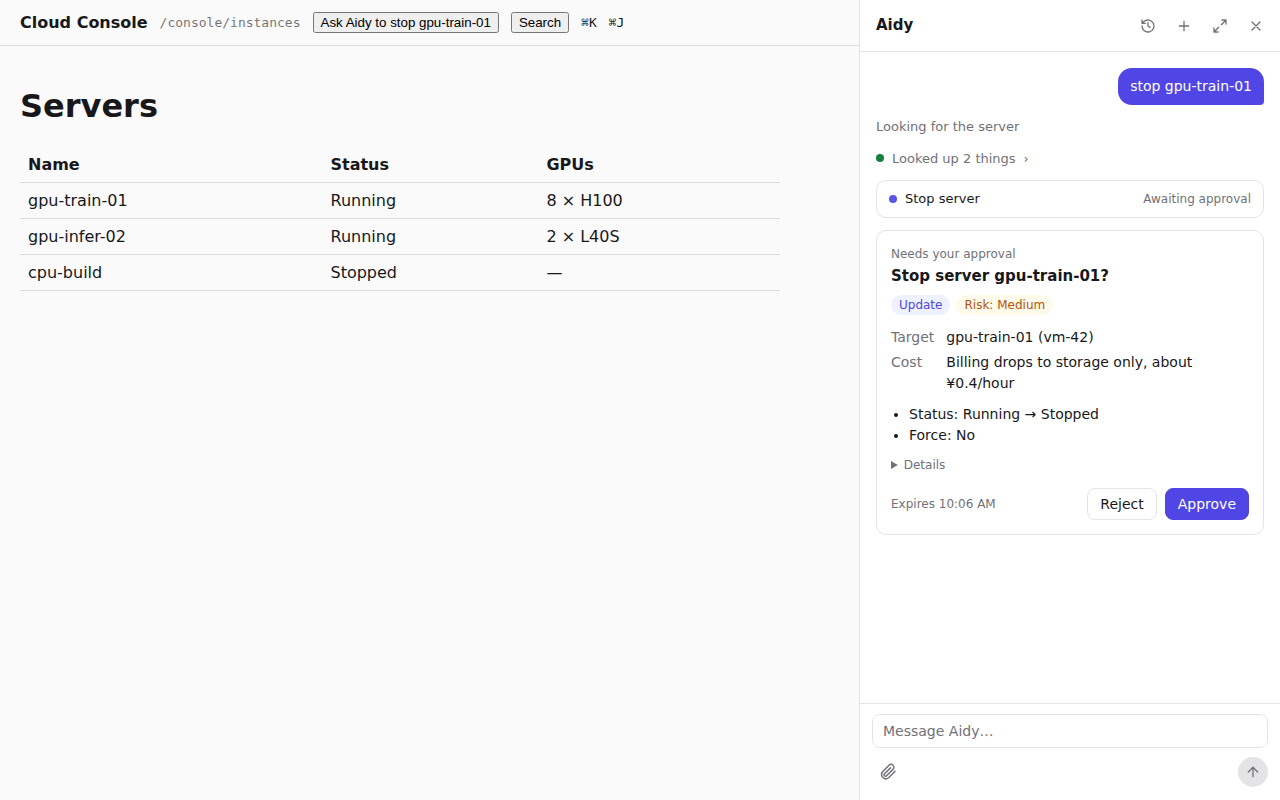
Press ⌘J and type "stop train-01". rungent looks up vm-42 as you, shows a card titled
"Stop server vm-42?", and calls your API only after you approve.
Where to go next#
- Forms and approvals: open your page's own create form in the conversation.
- Search and knowledge: answer from your docs, with citations.
For agents: quickstart.mdEdit this page