rungentConcepts
Surfaces
Where your users and their agents reach your product through rungent. The dock, ⌘K, MCP, your branded CLI, skill.md and llms.txt all draw from one catalog, act as the user, and ask before every write.
| Surface | Who uses it | What it offers | How a write is confirmed |
|---|---|---|---|
| The dock | Your users, beside your pages | Operations on agent, search, forms |
An approval card |
| ⌘K palette | Your users | Search over every source | Nothing to confirm |
MCP (/mcp) |
Claude Code, Cursor, Codex, other agents | Operations on mcp, search |
MCP elicitation |
| CLI | People and agents in a terminal | Operations on cli or mcp, search |
[y/N], or --yes |
skill.md, llms.txt |
Agents finding their way in | How to connect, and the operations | Not a caller |
Every surface calls your API as the user and shows only what that user's catalog holds. This page is the end user's side; the developer's side of the dock is in JavaScript.
Which operations appear where#
An operation's surfaces lists the surfaces that offer it. Reads default to all three; writes to
agent and cli. So MCP starts read-only, and writes reach a terminal through the CLI, which
asks before each one. Set the list to change that:
{ "name": "stop_vm", "effect": "update", "surfaces": ["agent", "mcp", "cli"] }
Role operations appear on no surface; search reaches every surface through the built-in
search tool instead.
The dock#
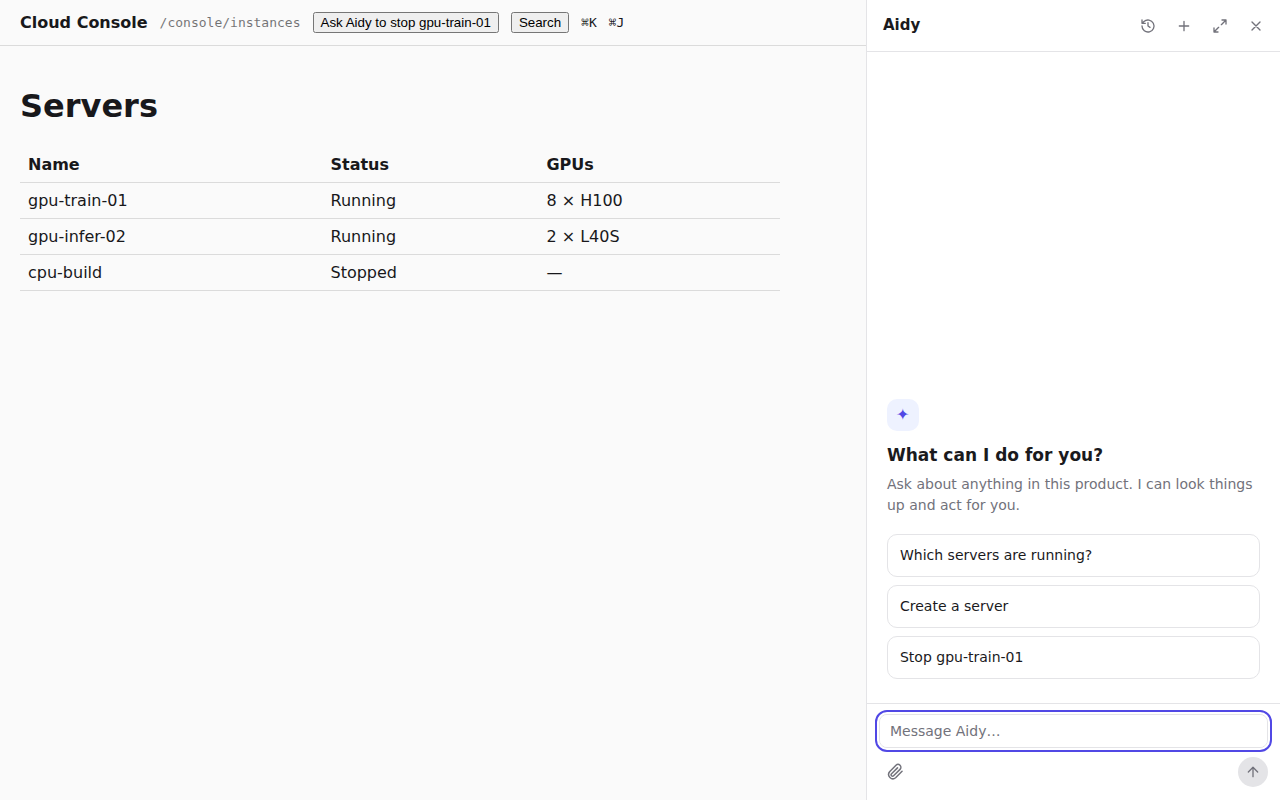
The dock opens beside your page and takes its room from the page instead of covering it, so the server list the assistant just changed stays in view. ⌘J (Ctrl+J) opens and closes it. The user drags its edge between 360 and 640 pixels; on a phone it fills the screen, and expanded it shows the conversation history beside the answer.
An empty conversation offers your suggestions. Text streams in with a caret, lookups show as
short rows ("Looked up 2 things"), and forms, approvals and questions appear in the conversation.
A ring shows how full the context is. What the user is looking at goes with each message, and
pages named by open are shown through your router.
⌘K search#
⌘K (Ctrl+K) opens the palette over every search source, grouped by type. Arrow keys move, Enter opens a hit, and the last row hands the query to the dock as a question.
MCP for coding agents#
Every rungent host serves MCP over streamable HTTP at <host>/mcp. A client signs in with a token
your API accepts as the user's (a personal access token, an API key or an OAuth access token),
and gets one tool per operation on mcp, plus search. rungent forwards the token on every call and
never stores it. Each tool carries hints from its effect (readOnlyHint, destructiveHint,
idempotentHint), and the client receives your skill guide as its instructions unless you set
mcp.instructions.
# Claude Code
claude mcp add --transport http console https://console.example.com/mcp \
  --header "Authorization: Bearer $CONSOLE_TOKEN"

# Codex
codex mcp add console --url https://console.example.com/mcp --bearer-token-env-var CONSOLE_TOKEN
// Cursor: .cursor/mcp.json
{ "mcpServers": { "console": { "url": "https://console.example.com/mcp",
  "headers": { "Authorization": "Bearer ${env:CONSOLE_TOKEN}" } } } }
Any other client takes the same three settings: streamable HTTP, the URL, and the
Authorization header. A stdio-only client goes through a bridge such as mcp-remote.
The simplest way to give users a token is a page in your product where they create one for their agents, scoped and revocable like any other API token.
Sign in with OAuth#
Clients that support MCP authorization can sign the user in through your OAuth server instead of
a pasted token. Name it with mcp: { authorizationServers: ['https://auth.example.com'] }
(RUNGENT_MCP_AUTHORIZATION_SERVERS with rungent serve). rungent then serves
/.well-known/oauth-protected-resource/mcp, and a request to /mcp without a valid token answers
401 with a WWW-Authenticate header that points there. The client runs the sign-in and retries
with the access token. Your server issues the tokens and your API checks them; rungent only forwards
them.
When MCP misbehaves#
| What you see | Why, and what to do |
|---|---|
401 on connect |
No token, or one your identity operation refuses. Check that the variable is set where the client starts. |
| A write is missing from the tools | Writes are on mcp only when listed in surfaces, and only for users who may use them. |
not_executed, "cannot ask for (elicitation)" |
The client cannot show a confirmation. Use one that can, the dock, or the CLI. |
404 session_not_found |
The session is gone: idle for 10 minutes, rungent restarted, or the token changed. Behind several replicas, route a session to one replica (Deploy). |
| OAuth sign-in never starts | Route /.well-known/oauth-protected-resource/mcp to rungent along with /mcp. |
A CLI with your name#
acme login https://console.example.com
acme vm stop gpu-train-01
Stop server gpu-train-01? [y/N] y
{ "id": "vm-42", "name": "gpu-train-01", "status": "stopped" }
The CLI has no commands of its own for your product: it connects to <host>/mcp, lists the
operations the signed-in user may use, and turns each into a command. A new operation is a new
command the next time it runs, with nothing to republish. Output is JSON, so agents script it as
easily as people type it; acme search "gpu" searches your product and docs.
rungent brand writes a small npm package whose bin is your command:
npx rungent brand --name acme --host https://console.example.com -o acme-cli --npm-name @acme/cli
cd acme-cli && npm publish --access public
It reads ACME_HOST and ACME_TOKEN (or the variables you name with --env-host and
--env-token), keeps its own logins, and depends on rungent, so a new rungent release
reaches it as an ordinary dependency update. Leave out --host for a product customers host
themselves. Every flag is in the CLI reference.
x-rungent.cli shapes the commands: {"command": "vm stop", "args": ["vm_id"]} turns
acme stop-vm --vm-id vm-42 into acme vm stop vm-42, and with resolve on vm_id,
acme vm stop gpu-train-01 works too.
skill.md and llms.txt#
rungent serves /skill.md, a skill an agent loads to use your product (how to connect, the safety
rules, every operation by area), and /llms.txt, the index of the same in the
llms.txt format. Both are generated from the catalog of whoever asks.
Asked without a credential, they list what your OpenAPI shows anonymously, or only how to connect
when your API asks for sign-in.
Tell agents which CLI to install with skill.cli in createRungent:
createRungent({
  // ...
  skill: { cli: { command: 'acme', package: '@acme/cli' }, guide: '…a hand-written guide placed first…' },
});
install takes a free-form line instead of a package. With rungent serve, set RUNGENT_CLI_COMMAND
and RUNGENT_CLI_PACKAGE or RUNGENT_CLI_INSTALL. Without any, the documents name rungent from
rungent. rungent docs writes the same documents as files for your docs site.
Once you ship, a user hands their agent one sentence:
Install the skill at https://console.example.com/skill.md and use it to manage my servers.
Where to go next#
JavaScript mounts rungent and the dock in your app.
For agents: surfaces.mdEdit this page